Building a consistent React data-fetching layer with TanStack Query
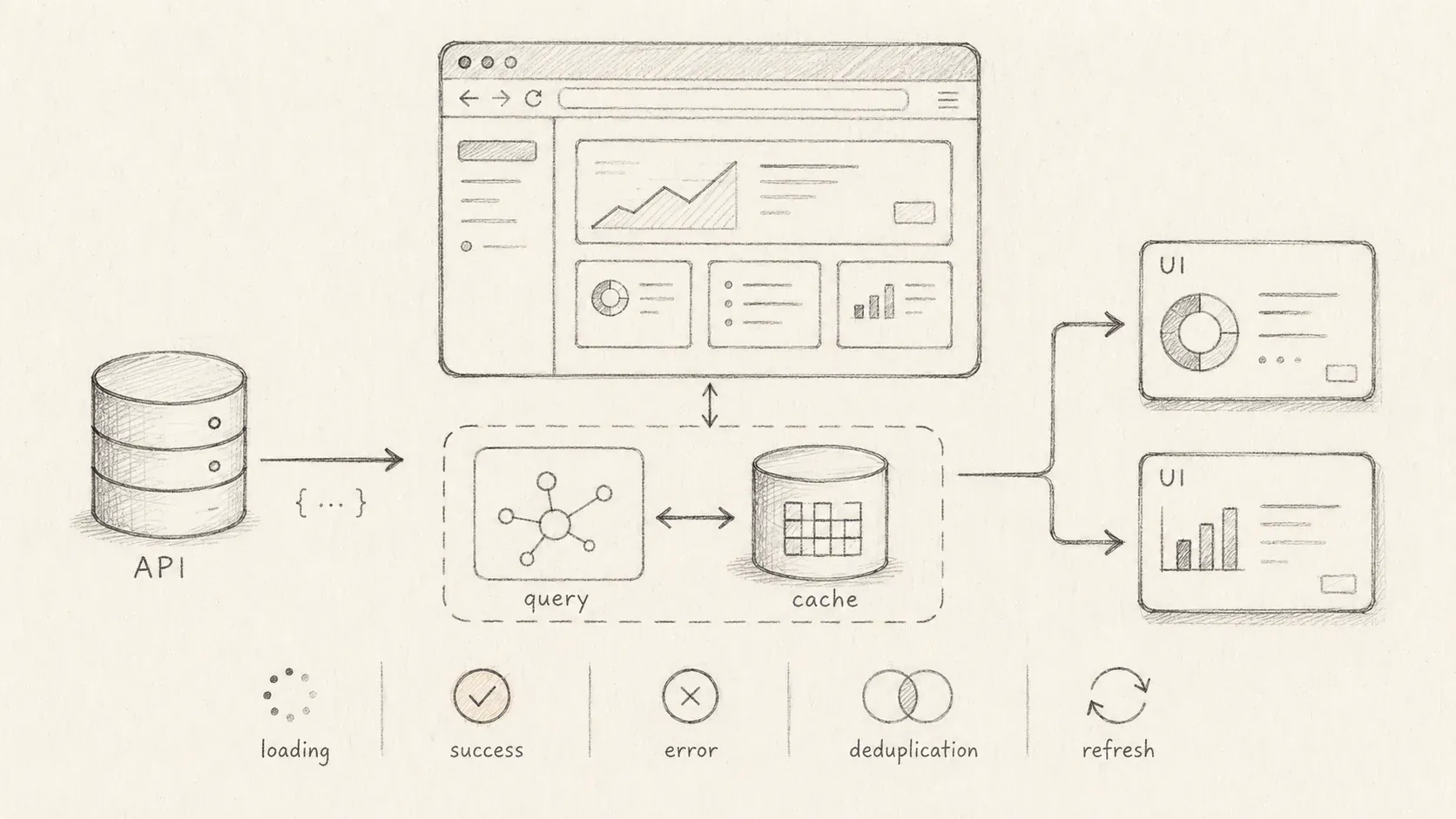
A React data-fetching pattern using TanStack Query, custom hooks, and a small REST API DSL.
A small React application can call fetch or useQuery inside a component. As the application grows, repeated query keys, endpoints, and options spread across the component tree. Custom hooks collect some of that code. A typed router such as tRPC can go further by generating queryKeys, queryOptions, and mutationOptions factories.
Most REST APIs do not expose a typed router. This pattern adapts the @trpc/tanstack-react-query factory approach to REST. A small wrapper around Axios and TanStack Query centralizes endpoints, query keys, and network options. Each endpoint can still define its own types and Query options.
I developed the pattern for an IT department's maintenance and support-ticket application. Dozens of lists, dashboards, detail pages, wizards, and modal flows needed the same request behavior. This project uses Axios, but the factories can wrap fetch, Ky, SuperAgent, or another HTTP client.
Why not just call useQuery everywhere?
Calling useQuery and useMutation in each component works at first, but it repeats decisions that should stay consistent:
-
Query keys determine the cache entry. Hand-written keys in many components can assign different data to the same key or the same data to different keys.
-
Options such as
staleTimeandplaceholderDatadrift when every component sets its own defaults. -
Authentication, errors, uploads, and invalidation leak into interface code.
Custom hooks collect a useQuery call and its result. They work for queries with few options, but each hook still composes options and invalidation logic by hand. Query and mutation factories move that repeated work into one definition per operation. The tRPC integration follows this pattern with queryOptions, mutationOptions, and queryKey. Each factory knows the procedure path, input types, defaults, and cache key.
My goal is to reproduce that experience for a REST API.
Overview of the pattern
The pattern is built around six pieces:
1. HTTP client with auth and guards
Instead of calling fetch directly, create an Axios instance that injects an Authorization header from your auth store and handles token expiry. Use interceptors to add a long timeout and log the user out on 401 or expired JWT responses. The client exposes a simple client.get/post/put/delete API that returns the response data.
Isolating auth logic in the client keeps network concerns away from components. You can extend this with retry logic, cancellation or instrumentation later.
2. Centralized endpoint definitions
Next, put all of your API paths in a single endpoint.ts file. Each entry is a pure string or function that builds a path. Because components never concatenate strings themselves, it's obvious where to modify routes, and TypeScript can help you avoid mismatched parameters.
import qs from "qs";

export const endpoint = {
  getTickets: "/tickets",
  getTicket: (id: number) => `/tickets/${id}`,
  getTicketReport: (dimension: "priority" | "subject", range?: DateRange) => {
    const query = qs.stringify(
      { dimension, range },
      { skipNulls: true, addQueryPrefix: true }
    );
    return `/tickets/reports${query}`;
  },
  // ...more endpoints
};
Having endpoints centrally defined reduces typos and makes it easy to inspect available routes. Because the functions return plain strings, they can be used both by the client and by other tools (e.g., for mocking).
3. Query and mutation factories
This is the heart of the pattern. Instead of writing custom hooks, I expose small factory functions that produce TanStack Query options. Inspired by tRPC's integration, my factories expose three things:
-
endpoint: the path or path generator. -
queryKey(params): a stable key function to uniquely identify cached data. -
queryOptions(params, overrides?): builds an options object foruseQuery, including thequeryKey,queryFn, defaultstaleTimeand optional flags.
For mutations there is an analogous mutationOptions(params, overrides?) that selects the HTTP verb and returns a mutationFn. Upload and download helpers can also track progress and return a Blob when appropriate.
const DEFAULT_STALE_TIME = 2 * 60 * 5000;

function resolvePath<TParams>(path: Endpoint<TParams>, params: TParams) {
  return typeof path === "function" ? path(params) : path;
}

function createQuery<TParams, TResult>({
  path,
  key,
  enabled,
  staleTime,
  placeholderData,
}: QueryBuilder<TParams, TResult>) {
  return {
    endpoint: path,
    queryKey: (params: TParams) => key(params),
    queryOptions: (params: TParams, overrides = {}) => {
      const resolved = resolvePath(path, params);
      // query function uses Axios client and abort signal
      const queryFn: QueryFunction<TResult> = async ({ signal }) =>
        (await client.get<TResult>(resolved, { signal })).data;

      return {
        queryKey: key(params),
        // skip the query if enabled() returns false.
        // React Query’s skipToken is a type‑safe way to disable a query.
        queryFn: enabled ? (enabled(params) ? queryFn : skipToken) : queryFn,
        staleTime: staleTime ?? DEFAULT_STALE_TIME,
        placeholderData,
        ...overrides,
      } satisfies UseQueryOptions<TResult>;
    },
  };
}

function createMutation<TParams, TVariables = void, TResult = void>({
  path,
  method,
}: MutationBuilder<TParams>) {
  return {
    endpoint: path,
    mutationOptions: (params: TParams, overrides = {}) => {
      const resolved = resolvePath(path, params);
      const mutationFn: MutationFunction<TResult, TVariables> = async (
        variables
      ) => {
        switch (method) {
          case "put":
            return (await client.put<TResult>(resolved, variables)).data;
          case "patch":
            return (await client.patch<TResult>(resolved, variables)).data;
          case "delete":
            return (await client.delete<TResult>(resolved)).data;
          default:
            return (await client.post<TResult>(resolved, variables)).data;
        }
      };

      return {
        mutationFn,
        ...overrides,
      } satisfies UseMutationOptions<TResult, unknown, TVariables>;
    },
  };
}
To assemble a domain-specific API, you call these helpers for every resource and operation. For example, to create queries and mutations for tickets:
import { endpoint } from "./endpoint";
import { createQuery, createMutation } from "./request";

export const tickets = {
  list: createQuery<TicketFilters, Paginated<Ticket>>({
    path: endpoint.getTickets,
    key: (filters: TicketFilters) => ["tickets", filters],
    // disable query when filters are empty
    enabled: (f) => Boolean(f),
    // keep previous page visible while loading the next page
    placeholderData: keepPreviousData,
  }),
  detail: createQuery<number, Ticket>({
    path: endpoint.getTicket,
    key: (id: number) => ["ticket", id],
  }),
  create: createMutation<void, AddTicketPayload, Ticket>({
    path: endpoint.getTickets,
    method: "post",
  }),
  update: createMutation<number, UpdateTicketPayload, Ticket>({
    path: endpoint.getTicket,
    method: "patch",
  }),
  delete: createMutation<number>({
    path: endpoint.getTicket,
    method: "delete",
  }),
};
Notice how the list query uses placeholderData: keepPreviousData so that when you change pages or filters, the previous list remains visible while new data is loading. In React Query v5, placeholderData combined with the special keepPreviousData value keeps the prior data in the cache and exposes an isPlaceholderData flag. That flag allows you to show a subtle loading indicator while preserving the old list.
For optional parameters, I use the enabled callback to return false when parameters are missing. Internally, the query factory will return React Query's skipToken, which disables the query in a type-safe way. The docs note that skipToken disables the query and is a good alternative to enabled: false.
4. Query client provider
Wrap your application with a single QueryClientProvider so that TanStack Query can cache data across the component tree. It's important to create the QueryClient only once; re-creating it on every render resets the cache.
Here's how I set up my providers:
import { QueryClient, QueryClientProvider } from "@tanstack/react-query";

const queryClient = new QueryClient({
  defaultOptions: {
    queries: { retry: false }, // optional, adapt
  },
});

export function TanStackQueryProvider({
  children,
}: {
  children: React.ReactNode;
}) {
  return (
    <QueryClientProvider client={queryClient}>{children}</QueryClientProvider>
  );
}
Wrap this provider around your router and any other global providers in main.tsx.
5. Component usage patterns
Components pass the factory output directly to TanStack Query:
Detail pages
const { id } = useParams();

// the type of data will be correctly infered to: Ticket | undefined
const { data, isPending } = useQuery(api.tickets.detail.queryOptions(id));

if (!data && isPending) return <Skeleton />;
return <TicketDetails ticket={data} />;
Lists with filtering and pagination
const filters = useMemo(
  () => ({
    search,
    page,
    pageSize,
  }),
  [search, page, pageSize]
);

const { data, isPending, isPlaceholderData } = useQuery(
  api.tickets.list.queryOptions(filters)
);

return (
  <>
    {isPending && !isPlaceholderData ? <Spinner /> : null}
    <TicketTable tickets={data?.items ?? []} />
    <Pagination
      page={page}
      total={data?.meta.totalPages ?? 1}
      onChange={(p) => setPage(p)}
    />
  </>
);
Because placeholderData: keepPreviousData is configured in the API, changing filters doesn't blank the table; you still see the old page while the new page loads. You can use isPlaceholderData to dim the table or show a subtle loading bar.
Mutations
For create/update/delete operations, call useMutation with the mutation options produced by the factory. Optionally invalidate queries on success:
const queryClient = useQueryClient();
const mutation = useMutation(
  api.tickets.create.mutationOptions(undefined, {
    onSuccess: async () => {
      // invalidate the list and any related dashboard queries
      await Promise.all([
        queryClient.invalidateQueries({
          queryKey: api.tickets.list.queryKey(),
        }),
        queryClient.invalidateQueries({
          queryKey: api.dashboard.overview.queryKey(),
        }),
      ]);
      toast.success("Ticket created");
    },
  })
);

// trigger mutation
mutation.mutate(formData);
Thanks to the factory, you don't have to remember the HTTP verb or endpoint; the mutation function is already wired up. You can even pass additional React Query options (e.g., onMutate, onError) through the overrides argument.
6. Putting it all together
To use this pattern in a fresh project:
-
Install dependencies - you need
@tanstack/react-query,axiosand optionallyqsfor query string building. -
Wrap your app in a
QueryClientProvider. Create the client once and pass it to the provider -
Create an Axios client with base URL and interceptors for auth and error handling.
-
Centralize endpoints in a file of pure string builders.
-
Write query/mutation factories. Provide defaults like
staleTimeandplaceholderData, and returnskipTokenwhen queries should be disabled. -
Group your API by domain - e.g.
api.tickets.listorapi.users.detail- and export factories for each operation. -
Use
useQueryanduseMutationin your components by passing the options produced by your API factories. Invalidate queries viaqueryClient.invalidateQueriesusing the query keys from the API.
Trade-offs
What the factories improve
-
Centralizing the
queryKeyand options makes it impossible to accidentally cache different data under the same key. It also ensures that defaults likestaleTimeorretryare applied consistently. -
Because the factories return plain TanStack Query options, you can pass them into any of the query hooks (
useQuery,useSuspenseQuery,useInfiniteQuery) or utilities likequeryClient.prefetchQuery. The pattern doesn't hide React Query; it simply reduces boilerplate. -
TRPC's integration advocates using factories for
queryOptions,mutationOptionsandqueryKey. My pattern mirrors that API: you writeuseQuery(api.tickets.detail.queryOptions(id))instead ofuseQuery(['tickets', id], () => client.get(...)). The difference is that you define your own types instead of relying on tRPC to infer them. This manual typing is more work up front but gives you full control over response shapes and allows you to use any backend, not just tRPC.
What they cost
-
The biggest downside compared to tRPC is that your factories can't infer input/output types from a router. You must define
TParamsandTResultfor each query and mutation. However, the pattern still centralizes those definitions, making them easy to update. -
Although the pattern centralizes endpoints and options, you still need to follow best practices: use stable query keys, invalidate queries appropriately and avoid creating multiple
QueryClientinstances. React Query's docs emphasise that queries are disabled by default when usingskipToken- but callingrefetch()on askipTokenquery doesn't work. You need to keep such edge cases in mind.
The wrapper's boundary
The wrapper gives a REST API the query and mutation factories that tRPC generates from its router. It keeps endpoint paths, cache keys, HTTP behavior, and default options outside React components. The cost is manual input and output types for every operation. For a growing REST application, that explicit setup can be easier to maintain than dozens of unrelated custom hooks.