Getting started with value objects in Symfony
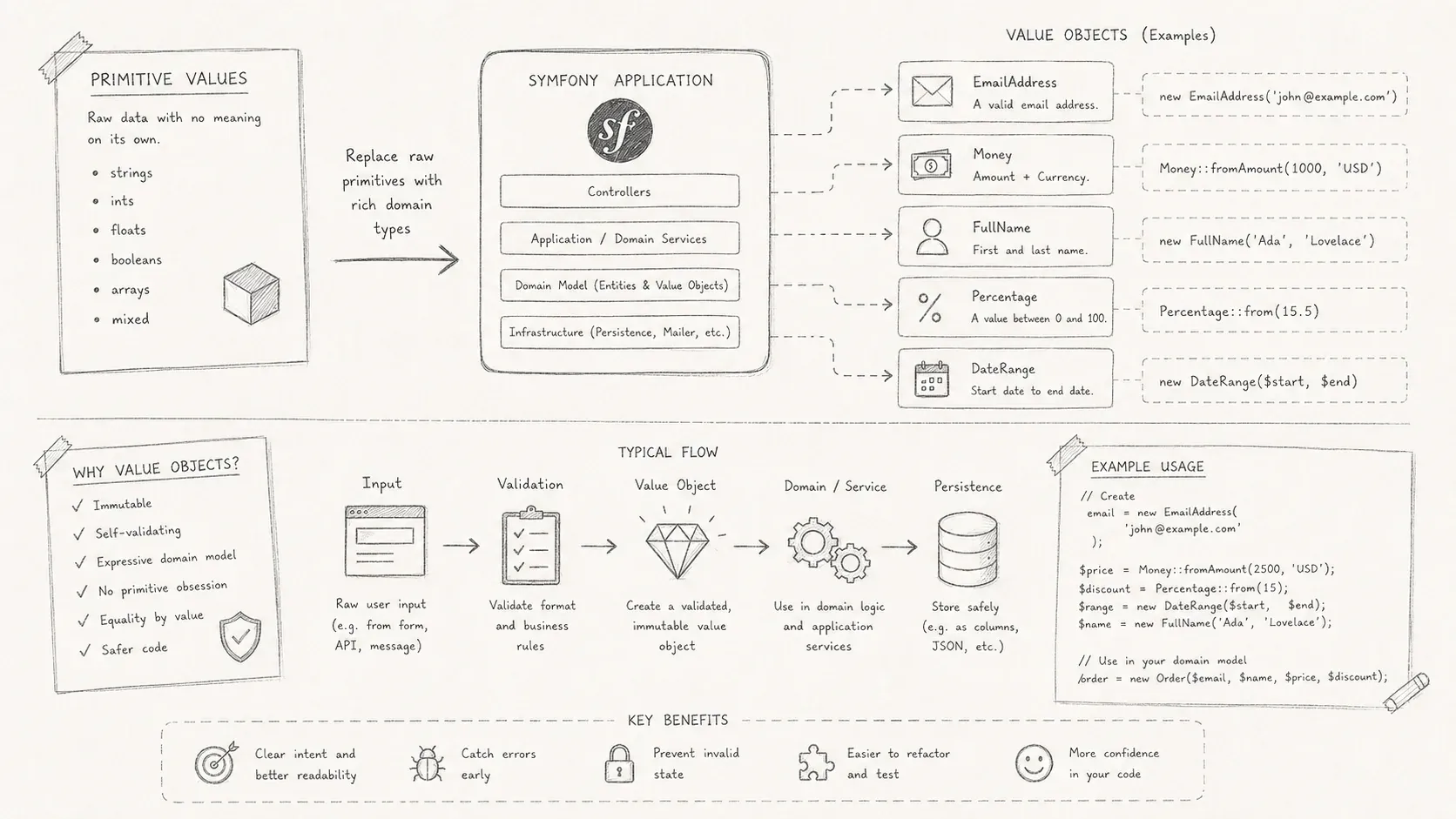
How value objects can make Symfony domain code clearer, stricter, and easier to maintain.
Strings and integers carry data, but they do not carry business rules. A string may contain an email address, username, country code, or arbitrary text. The type system treats them all alike. As a Symfony application grows, validation for those values often spreads across forms, services, and entities. Value objects put the value and its rules back together.
The limits of primitive types
Consider this Student class:
Every field uses a primitive type, so the class itself cannot guarantee what those strings contain.
-
A string called
emailhas no more type information than a string calledcity. -
Each caller may validate the same value differently or forget validation altogether.
-
Invalid data can reach the entity before the mistake becomes visible.
The problem is not primitive types themselves. It is using them after a value has acquired rules and meaning in the domain.
What value objects are
Value objects are defined by their contents rather than an identity. An entity has an ID that distinguishes it from other entities. Two value objects with the same contents represent the same value.
-
A value object validates its own data. An
Emaildoes not only store an address. It rejects an invalid one. -
It is immutable. Changing a value creates a new object.
-
Equality compares contents, not object references.
PHP's DateTimeImmutable and SplFileInfo are familiar examples.
Create value objects in Symfony
1. Create the value object class
A value object should do two things:
-
Validate input when it is created.
-
Keep behavior such as formatting or transformation with the value.
Email value object
namespace App\Entity\ValueObject;

use Webmozart\Assert\Assert;

final readonly class Email implements \Stringable
{
    public string $email;

    public function __construct(string $value)
    {
        Assert::notEmpty($value);
        Assert::email($value);

        $this->value = $value;
    }

    #[\Override]
    public function __toString(): string
    {
        return $this->email;
    }
}
Username value object
namespace App\Entity\ValueObject;

use Webmozart\Assert\Assert;

final readonly class Username implements \Stringable
{
    private const int MIN_LENGTH = 3;
    private const int MAX_LENGTH = 30;
    private const string PATTERN = 'some complex regex';

    private string $username;

    private function __construct(string $username)
    {
        Assert::notEmpty($username);
        Assert::minLength($username, self::MIN_LENGTH);
        Assert::maxLength($username, self::MAX_LENGTH);
        Assert::pattern($username, self::PATTERN);

        $this->username = $username;
    }

    #[\Override]
    public function __toString(): string
    {
        return $this->username;
    }
}
2. Move external validation to factories
An Address may need validation that the object cannot perform alone. Checking whether a country or city exists could require a database query or external service. A factory can perform that work before it creates the value object.
Address value object
namespace App\Entity\ValueObject;

final readonly class Address
{
    public function __construct(
        public ?string $city = null,
        public ?string $country = null,
        public ?string $addressLine1 = null,
        public ?string $addressLine2 = null
    ) {
    }
}
Use a factory when validation depends on services outside the value object. Inject that factory into forms or application services that create the value.
Address factory
namespace App\Factory;

use App\Entity\ValueObject\Address;
use Symfony\Component\Intl\Countries;
use Webmozart\Assert\Assert;

final readonly class AddressFactory
{
    public function create(
        ?string $city,
        ?string $country,
        ?string $line1,
        ?string $line2
    ): Address {
        Assert::notEmpty($city, 'City cannot be empty');
        Assert::notEmpty($country, 'Country cannot be empty');
        Assert::notEmpty($addressLine1, 'Address line 1 cannot be empty');
        Assert::nullOrNotEmpty($addressLine2, 'Address line 2 cannot be empty');

        // or any data source like a repository etc...
        if (!Countries::alpha3CodeExists($country) || !Countries::exists($country)) {
            throw new \InvalidArgumentException('Invalid Country');
        }

        return new Address($city, $country, $addressLine1, $addressLine2);
    }
}
With this design, an Address instance has already passed the required checks. Callers do not need to validate it again.
3. Persist value objects with Doctrine
Doctrine's embeddables map a value object's fields as part of its owning entity.
Email value object
namespace App\Entity\ValueObject;

use Doctrine\ORM\Mapping\Column;
use Doctrine\ORM\Mapping\Embeddable;
use Webmozart\Assert\Assert;

#[Embeddable]
final readonly class Email implements \Stringable
{
    #[Column(type: "string")]
    public string $email;
}
Username value object
namespace App\Entity\ValueObject;

use Doctrine\ORM\Mapping\Column;
use Doctrine\ORM\Mapping\Embeddable;
use Webmozart\Assert\Assert;

#[Embeddable]
final readonly class Username implements \Stringable
{
    #[Column(type: "string")]
    public string $username;
}
Address value object
namespace App\Entity\ValueObject;

use Doctrine\ORM\Mapping\Column;
use Doctrine\ORM\Mapping\Embeddable;

#[Embeddable]
final class Address
{
    public function __construct(
        #[Column(length: 255)] public ?string $city = null,
        #[Column(length: 255)] public ?string $country = null,
        #[Column(length: 255)] public ?string $addressLine1 = null,
        #[Column(length: 255, nullable: true)] public ?string $addressLine2 = null
    ) {
    }
}
This is the simplest approach, but you can also define a custom mapping type for more specific use cases.
4. Handle Symfony forms
A custom form type converts raw input into a value object. Implement DataMapperInterface to map between the form fields and the object. The value object still owns its validation rules.
Email type
namespace App\Form\Types;

use App\Entity\ValueObject\Email;
use Symfony\Component\Form\AbstractType;
use Symfony\Component\Form\DataMapperInterface;
use Symfony\Component\Form\Extension\Core\Type\EmailType as SymfonyEmailType;
use Symfony\Component\Form\FormBuilderInterface;
use Symfony\Component\Form\FormError;
use Symfony\Component\OptionsResolver\OptionsResolver;

final class EmailType extends AbstractType implements DataMapperInterface
{
    public function buildForm(FormBuilderInterface $builder, array $options): void
    {
        $builder->add('email', SymfonyEmailType::class, [
            'label' => "email",
            'attr' => [
                'placeholder' => 'exemple bernard@devscast.tech'
            ]
        ])->setDataMapper($this);
    }

    /**
     * @see https://github.com/symfony/symfony/issues/59950
     */
    public function getBlockPrefix(): string
    {
        return '';
    }

    public function configureOptions(OptionsResolver $resolver): OptionsResolver
    {
        parent::configureOptions($resolver);
        $resolver->setDefaults([
            'data_class' => Email::class, /** value object */
            'empty_data' => null
        ]);

        return $resolver;
    }

    public function mapDataToForms(mixed $viewData, \Traversable $forms): void
    {
        $forms = iterator_to_array($forms);
        $forms['email']->setData((string) $viewData);
    }

    public function mapFormsToData(\Traversable $forms, mixed &$viewData): void
    {
        $forms = iterator_to_array($forms);
        try {
            $viewData = new Email($forms['email']->getData());
        } catch (\InvalidArgumentException $e) {
            $forms['email']->addError(new FormError($e->getMessage()));
        }
    }
}
Override getBlockPrefix to distinguish this type from Symfony's native EmailType.
Username type
namespace App\Form\Types;

use App\Entity\ValueObject\Username;
use Symfony\Component\Form\AbstractType;
use Symfony\Component\Form\DataMapperInterface;
use Symfony\Component\Form\Extension\Core\Type\TextType;
use Symfony\Component\Form\FormBuilderInterface;
use Symfony\Component\Form\FormError;
use Symfony\Component\OptionsResolver\OptionsResolver;

final class UsernameType extends AbstractType implements DataMapperInterface
{
    public function buildForm(FormBuilderInterface $builder, array $options): void
    {
        $builder->add('username', TextType::class, [
            'label' => "nom d'utilisateur",
            'attr' => [
                'placeholder' => 'exemple @_bernard.ng_'
            ]
        ])->setDataMapper($this);
    }

    public function configureOptions(OptionsResolver $resolver): OptionsResolver
    {
        parent::configureOptions($resolver);
        $resolver->setDefaults([
            'data_class' => Username::class,
            'empty_data' => null
        ]);

        return $resolver;
    }

    public function mapDataToForms(mixed $viewData, \Traversable $forms): void
    {
        $forms = iterator_to_array($forms);
        $forms['username']->setData((string) $viewData);
    }

    public function mapFormsToData(\Traversable $forms, mixed &$viewData): void
    {
        $forms = iterator_to_array($forms);
        try {
            $viewData = new Username($forms['username']->getData());
        } catch (\InvalidArgumentException $e) {
            $forms['username']->addError(new FormError($e->getMessage()));
        }
    }
}
Address type using AddressFactory
This basic mapper cannot always attach an error to the precise field that caused it. If the form needs that control, an AddressFormFactory can own form validation and place each error. The example keeps the earlier AddressFactory to stay focused.
namespace App\Form\Types;

use App\Entity\ValueObject\Address;
use Symfony\Component\Form\AbstractType;
use Symfony\Component\Form\DataMapperInterface;
use Symfony\Component\Form\Extension\Core\Type\CountryType;
use Symfony\Component\Form\Extension\Core\Type\TextType;
use Symfony\Component\Form\FormBuilderInterface;
use Symfony\Component\OptionsResolver\OptionsResolver;

final class AddressType extends AbstractType implements DataMapperInterface
{
     public function __construct(
        private readonly AddressFactory $addressFactory
    ) {
    }

    public function buildForm(FormBuilderInterface $builder, array $options): void
    {
        $builder
            ->add('city', TextType::class)
            ->add('country', CountryType::class)
            ->add('addressLine1', TextType::class)
            ->add('addressLine2', TextType::class, [
                'required' => false
            ])
            ->setDataMapper($this);
    }

    public function configureOptions(OptionsResolver $resolver): OptionsResolver
    {
        parent::configureOptions($resolver);
        $resolver->setDefaults([
            'data_class' => Address::class,
            'empty_data' => null
        ]);

        return $resolver;
    }

    public function mapDataToForms(mixed $viewData, \Traversable $forms): void
    {
        $forms = iterator_to_array($forms);
        $forms['city']->setData($viewData?->city);
        $forms['country']->setData($viewData?->country);
        $forms['addressLine1']->setData($viewData?->addressLine1);
        $forms['addressLine2']->setData($viewData?->addressLine2);
    }

    public function mapFormsToData(\Traversable $forms, mixed &$viewData): void
    {
        $forms = iterator_to_array($forms);
        try {
            // encapsulate heavy validation logic
            $viewData = $this->addressFactory->create(
                $forms['city']->getData(),
                $forms['country']->getData(),
                $forms['addressLine1']->getData(),
                $forms['addressLine2']->getData()
            );
        } catch (\InvalidArgumentException $e) {
            // you can create custom exception for each field
            // and map it to the right field
            $forms['city']->addError(new FormError($e->getMessage()));
        }
    }
}
The controller and views do not need to change. Each form type maps input to a value object, and the entity no longer accepts the corresponding primitive values.
#[ORM\Entity(repositoryClass: StudentRepository::class)]
class Student
{
    #[ORM\Id]
    #[ORM\GeneratedValue]
    #[ORM\Column]
    private(set) ?int $id = null;

    public function __construct(
        #[ORM\Embedded(class: Email::class)]
        private(set) Email $email,

        #[ORM\Embedded(class: Username::class)]
        private(set) Username $username,

        #[ORM\Embedded(class: Address::class, columnPrefix: false)]
        private(set) Address $address,

        #[ORM\Column]
        private(set) \DateTimeImmutable $birthdate,
    ) {
    }
}
When value objects earn their place
Value objects give domain values a type and a constructor that enforces their rules. Their methods can format, compare, or transform the value without exposing its fields. Doctrine embeddables persist them, and custom Symfony form types create them from user input. The extra classes are worthwhile when a value has rules that primitive types cannot express.