Sharing shadcn/ui in a Next.js 16 monorepo with Bun and Turborepo
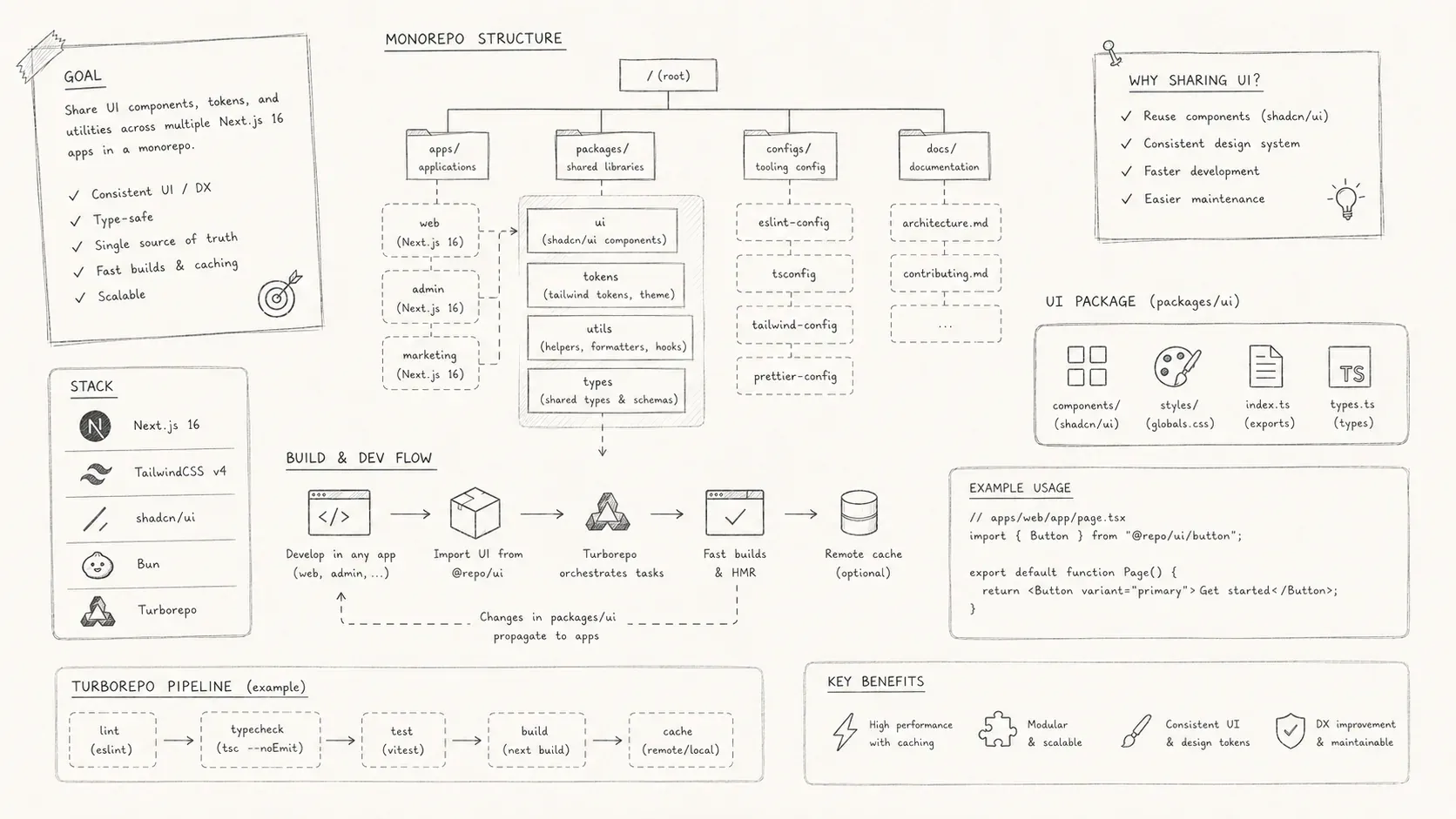
A shared UI library setup for a Bun and Turborepo monorepo using Next.js 16, React 19, Tailwind CSS v4, and shadcn/ui.
Sharing UI components across a monorepo becomes awkward when the package uses ESM, Tailwind CSS v4, Next.js 16, and shadcn/ui. This guide configures those tools once in a Bun and Turborepo workspace. Each application consumes the same UI package without running shadcn init again.
The example comes from a shared library named @workspace/ui and a Next.js 16 dashboard that consumes it.
The UI package owns the Tailwind configuration, styles, tokens, and components. Applications import them.
Architecture overview
The workspace contains:
-
Next.js 16 and React 19
-
Tailwind CSS v4
-
shadcn/ui components with Radix UI, tailwind-variants, and tailwind-merge
-
Bun 1.3 or newer, Turborepo, and Biome
-
packages/uifor the shared component library -
apps/dashboardfor the Next.js application
The UI package owns Tailwind, PostCSS, tokens, global styles, and base components. The applications do not duplicate that configuration.
Wire the workspace
The monorepo uses npm-style workspaces supported by Bun.
Root package.json:
The dashboard references the library through the workspace protocol:
{
  "dependencies": {
    "@workspace/ui": "workspace:*",
  },
  "name": "@workspace/dashboard",
}
This lets Next.js transpile and bundle the shared package as if it were a local dependency.
Build the shared UI package
The UI package owns the components, styles, Tailwind and PostCSS configuration, tokens, and shadcn/ui aliases.
packages/ui/package.json:
{
  "name": "@workspace/ui",
  "type": "module",
  "exports": {
    "./components/*": "./src/components/*.tsx",
    "./lib/*": "./src/lib/*.ts",
    "./globals.css": "./src/styles/globals.css",
    "./postcss.config": "./postcss.config.mjs"
  }
}
The exports field provides these import paths:
import { Button } from "@workspace/ui/components/button";
import "@workspace/ui/globals.css";
The package uses ESM throughout.
Tailwind v4 no longer uses config files by default. Instead, directives inside a CSS file drive the entire engine. Your unified stylesheet:
packages/ui/src/styles/globals.css:
@import "tailwindcss";
@import "tw-animate-css";

/* Tell Tailwind what to scan */
@source "../../../apps/**/*.{ts,tsx}";
@source "../../../components/**/*.{ts,tsx}";
@source "../**/*.{ts,tsx}";
This file is exported so each app can import it exactly once.
packages/ui/postcss.config.mjs:
export default {
  plugins: {
    "@tailwindcss/postcss": {}
  }
}
This uses the official Tailwind v4 PostCSS plugin documented in the shadcn/ui monorepo guide.
You export it so the apps can plug into the same config.
Right now the consuming apps still need @tailwindcss/postcss installed on their side as well.
Configure the generator in packages/ui/components.json:
{
  "$schema": "https://ui.shadcn.com/schema.json",
  "aliases": {
    "components": "@workspace/ui/components",
    "hooks": "@workspace/ui/hooks",
    "lib": "@workspace/ui/lib",
    "ui": "@workspace/ui/components",
    "utils": "@workspace/ui/lib/utils"
  },
  "iconLibrary": "lucide",
  "rsc": true,
  "style": "new-york",
  "tailwind": {
    "baseColor": "neutral",
    "config": "",
    "css": "src/styles/globals.css",
    "cssVariables": true
  },
  "tsx": true
}
utils.ts usually exposes the cn helper (class merging):
import { clsx } from "clsx";
import { twMerge } from "tailwind-merge";

export function cn(...args) {
  return twMerge(clsx(args));
}
Wire the Next.js 16 application
Next.js must transpile the external workspace package and include its styles.
apps/dashboard/next.config.ts:
const nextConfig = {
  transpilePackages: ["@workspace/ui"]
};

export default nextConfig;
This setting is required because the UI package:
-
ships TypeScript and ESM;
-
contains CSS imports; and
-
defines Tailwind v4 scanning rules.
Without transpilation, Next.js cannot bundle the package correctly.
apps/dashboard/postcss.config.mjs:
export { default } from "@workspace/ui/postcss.config";apps/dashboard/src/app/layout.tsx:
import "@workspace/ui/globals.css";Since the UI package owns all tokens and layers, the app becomes style-declarative rather than style-authoritative.
apps/dashboard/tsconfig.json:
{
  "compilerOptions": {
    "paths": {
      "@/*": ["./src/*"],
      "@workspace/ui/*": ["../../packages/ui/src/*"]
    }
  }
}
The second alias is critical:
-
You get live types during development
-
No need to publish a build of
@workspace/uijust to get correct types
The app also has a components.json:
{
  "$schema": "https://ui.shadcn.com/schema.json",
  "aliases": {
    "components": "@/components",
    "hooks": "@/hooks",
    "lib": "@/lib",
    "ui": "@workspace/ui/components",
    "utils": "@workspace/ui/lib/utils"
  },
  "iconLibrary": "lucide",
  "rsc": true,
  "style": "new-york",
  "tailwind": {
    "baseColor": "neutral",
    "config": "",
    "css": "../../packages/ui/src/styles/globals.css",
    "cssVariables": true
  },
  "tsx": true
}
So if you run:
cd apps/dashboard
bunx --bun shadcn@latest add button
The generated component references your shared library correctly and in your page:
import { Button } from "@workspace/ui/components/button";

export default function Page() {
  return <Button>Click me</Button>;
}
The generated component now imports the shared button from @workspace/ui.
What the setup provides
-
The dashboard imports one CSS file,
@workspace/ui/globals.css. -
The
@sourcedirectives make Tailwind scanapps/**/*andpackages/ui/**/*. -
shadcn/ui generates imports that point to
@workspace/ui. -
Next.js transpiles the UI package and handles its CSS, TypeScript, and ESM.
-
The monorepo has one Tailwind and PostCSS configuration, consumed by every application.