Sending GitHub notifications to Telegram with a Symfony webhook
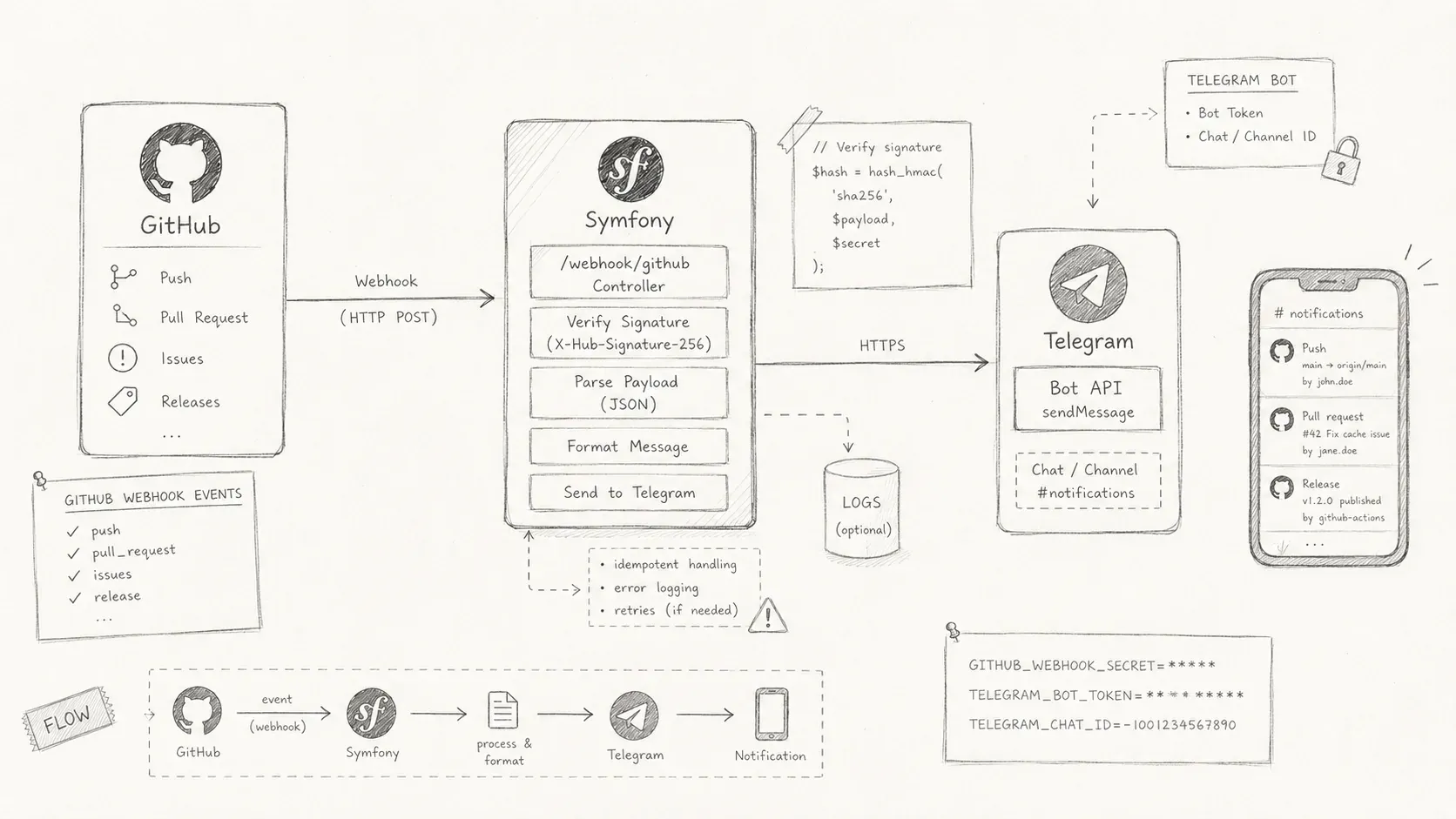
A Symfony webhook flow for sending GitHub repository notifications to Telegram.
My team communicates on Telegram. I wanted GitHub activity to appear there too, especially when a colleague pushed to one of our projects. A Telegram bot and a Symfony webhook gave me a direct route between the two services.
What is a webhook?
A webhook lets one application send data to another when an event occurs. The receiving application does not have to poll an API. GitHub can instead send a request as soon as someone pushes a commit or opens a pull request.
Prepare GitHub and Telegram
First, create a webhook for the GitHub repository or organization by following GitHub's instructions. Then message BotFather on Telegram to create a bot and obtain an API token.
Build the webhook
This guide starts with an existing Symfony project. Install Symfony's Webhook and RemoteEvent components and the Telegram Bot API client for PHP. I contribute to that client.
Store the API token and webhook secret in environment variables. For a deployed application, Symfony's secrets system can keep these values out of plain-text configuration.
# .env.local
TELEGRAM_API_TOKEN=xxxxxxxx:xxxxxxxxxxxxxxxxxxx
GITHUB_WEbHOOK_SECRET=xxxxxxxxxxxxxxxxxxxxxxxxxxxxx
Define service parameters for both values. Symfony can then inject them through autowiring.
# config/service.yaml
parameters:
    telegram_api_token: '%env(TELEGRAM_API_TOKEN)%'
    github_webhook_secret: '%env(GITHUB_WEbHOOK_SECRET)%'
Configure the Telegram client once with the token defined above:
# config/service.yaml
services:
    TelegramBot\Api\BotApi:
        arguments:
            - '%telegram_api_token%'
The GitHub webhook needs two classes:
-
RequestParserreceives GitHub's JSON POST request and returns aRemoteEventobject. -
WebhookConsumerreceives theRemoteEventand handles it.
Symfony Maker can generate both classes:
php bin/console make:webhook githubThe command creates src/RemoteEvent/GithubWebhookConsumer.php and src/Webhook/GithubRequestParser.php. The Webhook component also registers a /webhook/{type} route, so this example listens at http://localhost:8000/webhook/github. Use that URL in GitHub. You can expose a local server for testing with ngrok.
# config/packages/webhook.yaml
framework:
    webhook:
        routing:
            github:
                service: App\Webhook\GithubRequestParser
                secret: '%github_webhook_secret%'
The github_webhook_secret lets the parser verify that GitHub sent the request. GitHub uses the secret to generate sha1 and sha256 signatures, which the application validates before accepting the payload.
GithubRequestParser
This class has three methods:
-
getRequestMatcherchecks that the request has the expected source, method, and JSON format. -
doParseconverts the request into aRemoteEvent. -
validateSignaturechecks the signature with the webhook secret.
use Symfony\Component\HttpFoundation\HeaderBag;
use Symfony\Component\HttpFoundation\ChainRequestMatcher;
use Symfony\Component\HttpFoundation\Request;
use Symfony\Component\HttpFoundation\RequestMatcherInterface;
use Symfony\Component\RemoteEvent\RemoteEvent;
use Symfony\Component\Webhook\Client\AbstractRequestParser;
use Symfony\Component\Webhook\Exception\RejectWebhookException;
use Symfony\Component\HttpFoundation\RequestMatcher\{
    MethodRequestMatcher,
    IsJsonRequestMatcher
};


final class GithubRequestParser extends AbstractRequestParser
{
    protected function getRequestMatcher(): RequestMatcherInterface
    {
        return new ChainRequestMatcher([
            new MethodRequestMatcher(Request::METHOD_POST),
            new IsJsonRequestMatcher()
        ]);
    }

    protected function doParse(
        Request $request,
        #[\SensitiveParameter] string $secret
    ): ?RemoteEvent {
        $this->validateSignature(
            headers: $request->headers,
            body: $request->getContent(),
            secret: $secret
        );

        return new RemoteEvent(
            name: $request->headers->get('X-GitHub-Event'),
            id: $request->headers->get('X-GitHub-Hook-ID'),
            payload: $request->getPayload()->all()
        );
    }

    private function validateSignature(
        HeaderBag $headers, string $body,
        #[\SensitiveParameter] string $secret
    ): void {
        $signature = hash_hmac('sha256', $body, $secret);

        if (!hash_equals($signature, $headers->get('X-Hub-Signature-256'))) {
            throw new RejectWebhookException(406, 'Invalid signature.');
        }
    }
}
GithubWebhookConsumer
The consumer checks the GitHub event type and uses the Telegram client to send a message to the group chat. Add the bot to the group first. This answer explains how to find the group's chat ID.
use TelegramBot\Api\BotApi;
use Psr\Log\LoggerInterface;
use Symfony\Component\RemoteEvent\Attribute\AsRemoteEventConsumer;
use Symfony\Component\RemoteEvent\Consumer\ConsumerInterface;
use Symfony\Component\RemoteEvent\RemoteEvent;


#[AsRemoteEventConsumer('github')]
final readonly class GithubWebhookConsumer implements ConsumerInterface
{
    public function __construct(
        private BotApi $api,
        private LoggerInterface $logger
    ) {
    }

    public function consume(RemoteEvent $event): void
    {
        $name = $event->getName();

       try {
           match (true) {
               $name === 'push' => $this->handlePushEvent($event),
               $name === 'ping' => $this->handlePingEvent($event),
               default => null,
           };
       } catch (\Throwable $e) {
              $this->logger->error($e->getMessage());
       }
    }

    private function handlePushEvent(RemoteEvent $event): void
    {
        $data = $event->getPayload();
        $project = $data['repository']['full_name'];
        $pusher = $data['pusher']['name'];
        $description = $data['head_commit']['message'];
        $ref = str_replace('refs/heads/', '', $data['ref']);
        $commit = substr(strval($data['after']), 0, 8);

        $message = vsprintf(
            format: $commit === '00000000' ?
                '🔥 %s deleted %s on %s' :
                '🔥 %s pushed %s on %s : %s',
            values: [$pusher, $ref, $project, $description]
        );

        $this->sendMessage($message);
    }

    private function handlePingEvent(RemoteEvent $event): void
    {
        $data = $event->getPayload();
        $message = sprintf('👉 Github ping : %s', $data['zen']);
        $this->sendMessage($message);
    }

    private function sendMessage(?string $message = null): void
    {
        if ($message !== null) {
            $this->api->sendMessage(
                chatId: 'your group id',
                text: $message,
                disablePreview: true,
                messageThreadId: 'your topic id if any'
            );
        }
    }
}
GitHub events now reach Telegram
The group now receives a notification whenever a colleague pushes to the project. Our team is small, so the volume remains manageable.
Symfony's Webhook and RemoteEvent components had limited documentation when I built this integration. This example records the configuration and the two extension points needed to connect them to Telegram.