How I Built End-to-End Authentication with Symfony, JWT, Refresh Tokens, and a BFF

A complete authentication flow from a type-safe login form to Symfony Security, rotating refresh tokens, server-side web sessions, protected API requests, logout, recovery, and federated login.
Ever implemented a login endpoint, received a JWT, and thought authentication was finished?
The endpoint is only the beginning.
A complete authentication system must decide where tokens live, how expired access tokens are renewed, how disabled accounts are rejected, how protected routes behave during server rendering, what logout invalidates, and how password recovery avoids leaking whether an account exists.
I faced these questions while building a Symfony API consumed by React applications. The API is stateless, but the browser still needs a secure and convenient session. I did not want long-lived tokens in localStorage, and I did not want every React component to understand JWT expiration.
My solution combines:
-
Symfony Security for credential verification and account checks.
-
A short-lived JWT access token.
-
A persisted, rotating refresh token.
-
A Backend for Frontend, or BFF, that keeps tokens away from browser JavaScript.
-
An opaque
HttpOnlycookie representing the web session. -
Domain policies for account status, password strength, lockout, and recovery challenges.
In this post, I’ll trace the complete flow and show how you can reproduce the same architecture in a generic Symfony and React application.
Authentication Is a Flow, Not an Endpoint
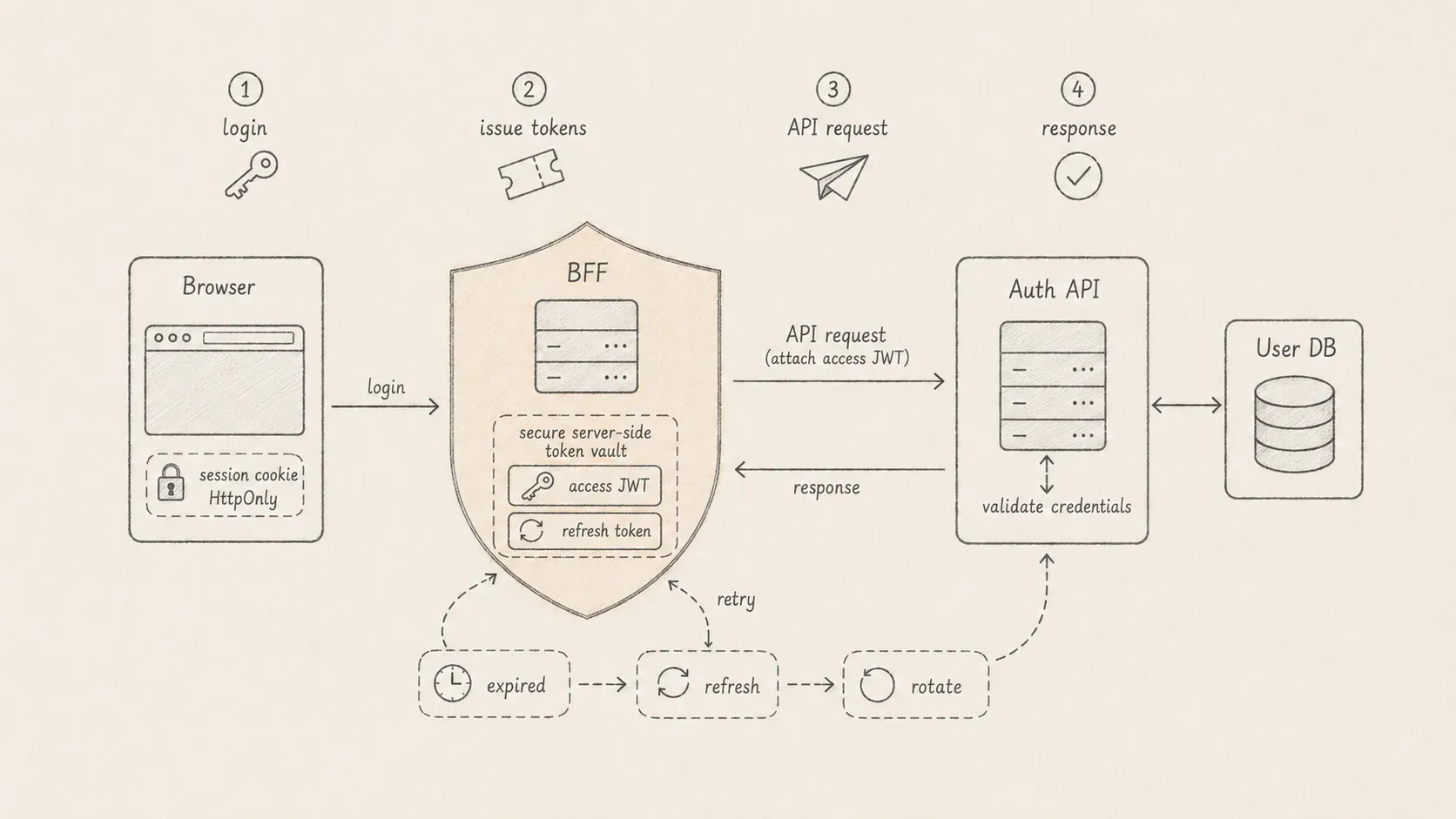
The complete password-login journey looks like this:
There are three distinct concerns here:
-
Authentication: who is making the request?
-
Session continuity: how does the application remember that identity safely?
-
Authorization: what is that identity allowed to do?
Keeping them separate prevents a convenient UI session from accidentally becoming the security authority.
Why I Put a BFF between the Browser and Symfony
A pure single-page application often stores the access token in memory or localStorage and attaches it to API requests.
localStorage is simple, but any JavaScript executing in the origin can read it. A successful cross-site scripting attack can exfiltrate both the access token and a long-lived refresh token.
I use a BFF instead:
The browser stores only an unpredictable session identifier in an HttpOnly cookie. The BFF stores the JWT and refresh token in a server-side session record.
Because the cookie is HttpOnly, browser JavaScript cannot read it. Because the JWT never needs to enter application JavaScript, React components do not become token managers.
This does not remove the need for XSS protection—an attacker can still perform actions through the victim’s browser—but it makes direct token theft more difficult.
Step 1: Define a Type-Safe Login Contract
The browser validates the login form with Zod:
I also validate the authentication response instead of asserting its type:
export const sessionUserSchema = z.object({
userId: z.string().uuid(),
email: z.email(),
roles: z.array(z.string()),
status: z.string(),
emailVerified: z.boolean(),
passwordChangeRequired: z.boolean(),
});
export const loginResponseSchema = z
.object({
token: z.string().min(1),
refreshToken: z.string().min(1),
user: sessionUserSchema,
})
.transform((response) => ({
accessToken: response.token,
refreshToken: response.refreshToken,
user: response.user,
}));
export type LoginSession = z.infer<typeof loginResponseSchema>;The frontend now has runtime validation and an inferred TypeScript type. If the Symfony response changes unexpectedly, authentication fails at the network boundary instead of creating a partially valid session.
Step 2: Submit Credentials through a Server Function
The browser does not call Symfony directly. It invokes a server function owned by the web application:
export const loginAction = createServerFn({ method: "POST" })
.inputValidator(loginSchema)
.handler(async ({ data }) => authWorkflow.login(data));The workflow translates the frontend contract into the field names expected by Symfony’s json_login authenticator:
async function login(data: LoginPayload) {
const response = await axios.post(
`${apiBaseUrl()}/identity/auth/login`,
{
username: data.email,
password: data.password,
},
{
headers: {
Accept: "application/json",
"Content-Type": "application/json",
"X-Client-Platform": "main",
},
},
);
const loginSession = loginResponseSchema.parse(response.data);
return sessionStore.persist(loginSession);
}The browser submits an email and password. The BFF receives tokens from Symfony, persists them server-side, and returns only the safe user snapshot to the page.
Passwords are never logged, cached, added to analytics, or copied into the session.
Step 3: Configure Symfony’s Login Firewall
The login route gets a dedicated stateless firewall:
# config/packages/security.yaml
security:
password_hashers:
Symfony\Component\Security\Core\User\PasswordAuthenticatedUserInterface: auto
providers:
app_user_provider:
id: App\Identity\Infrastructure\Security\SecurityUserProvider
firewalls:
login:
pattern: ^/api/identity/auth/login
stateless: true
json_login:
check_path: /api/identity/auth/login
success_handler: lexik_jwt_authentication.handler.authentication_success
failure_handler: lexik_jwt_authentication.handler.authentication_failure
user_checker: App\Identity\Infrastructure\Security\SecurityUserChecker
api:
pattern: ^/api
stateless: true
entry_point: jwt
jwt: ~
refresh_jwt:
check_path: identity.refresh_token
logout:
path: identity.invalidate_token
user_checker: App\Identity\Infrastructure\Security\SecurityUserCheckerThe login firewall performs the following work:
-
Reads
usernameandpasswordfrom JSON. -
Loads a security user through the configured provider.
-
Verifies the password with Symfony’s password hasher.
-
Runs account checks.
-
Calls the JWT success or failure handler.
No custom login controller is required for the password flow. The route exists as a security check path:
# config/routes.yaml
identity.login:
path: /api/identity/auth/login
methods: [POST]Step 4: Adapt the Domain User to Symfony Security
My domain User does not implement Symfony interfaces. Infrastructure creates a security snapshot instead:
final readonly class SecurityUser implements
UserInterface,
PasswordAuthenticatedUserInterface
{
public function __construct(
public UserId $userId,
public EmailAddress $email,
public AccountStatus $status,
public AccountLifecycle $lifecycle,
public Roles $roles,
public ?PasswordHash $password,
public bool $emailVerified,
public bool $passwordChangeRequired,
) {}
public static function fromDomainUser(User $user): self
{
return new self(
userId: $user->id,
email: $user->email,
status: $user->status,
lifecycle: $user->lifecycle,
roles: $user->roles,
password: $user->password,
emailVerified: $user->isEmailVerified(),
passwordChangeRequired: $user->passwordChangeRequired,
);
}
public function getUserIdentifier(): string
{
return (string) $this->email;
}
public function getPassword(): ?string
{
return $this->password?->__toString();
}
public function getRoles(): array
{
return $this->roles->toArray();
}
public function eraseCredentials(): void {}
}The provider loads the domain user and performs the translation:
final readonly class SecurityUserProvider implements UserProviderInterface
{
public function __construct(
private UserRepository $users,
) {}
public function loadUserByIdentifier(string $identifier): UserInterface
{
$user = $this->users->findByEmail(new EmailAddress($identifier));
if (!$user instanceof User) {
throw new UserNotFoundException();
}
return SecurityUser::fromDomainUser($user);
}
}This adapter protects the domain from Symfony while still letting the framework handle authentication correctly.
Step 5: Keep Account Access Rules in a Policy
A correct password is not enough. The account may be unverified, locked, suspended, archived, anonymized, or banned.
I express the decision in a domain policy:
final class AccountAccessPolicy
{
public function canAuthenticate(
bool $emailVerified,
AccountStatus $status,
AccountLifecycle $lifecycle,
): bool {
if (!$emailVerified) {
return false;
}
if ($lifecycle->archived || $lifecycle->anonymized) {
return false;
}
return $status === AccountStatus::Active;
}
}The Symfony user checker adapts that policy to the framework lifecycle:
final readonly class SecurityUserChecker implements UserCheckerInterface
{
public function __construct(
private AccountAccessPolicy $policy,
) {}
public function checkPreAuth(UserInterface $user): void
{
if (
$user instanceof SecurityUser
&& ($user->lifecycle->archived || $user->lifecycle->anonymized)
) {
throw new UserNotFoundException();
}
}
public function checkPostAuth(
UserInterface $user,
?TokenInterface $token = null,
): void {
if (
$user instanceof SecurityUser
&& !$this->policy->canAuthenticate(
$user->emailVerified,
$user->status,
$user->lifecycle,
)
) {
throw new CustomUserMessageAccountStatusException(
'Your account cannot authenticate.',
);
}
}
}Hidden account states return the same external behavior as an unknown identity. This reduces account-enumeration information.
Step 6: Issue Short-Lived Access Tokens and Rotating Refresh Tokens
I use asymmetric JWT signing:
# config/packages/lexik_jwt_authentication.yaml
lexik_jwt_authentication:
secret_key: '%env(resolve:JWT_SECRET_KEY)%'
public_key: '%env(resolve:JWT_PUBLIC_KEY)%'
pass_phrase: '%env(JWT_PASSPHRASE)%'
token_ttl: 3600
blocklist_token:
enabled: true
cache: cache.appThe private key signs tokens. API instances need the public key to verify them. The access token expires after one hour, limiting how long a stolen token remains useful.
Refresh tokens have a different lifecycle:
# config/packages/gesdinet_jwt_refresh_token.yaml
gesdinet_jwt_refresh_token:
refresh_token_class: App\Identity\Domain\Entity\RefreshToken
ttl: 2592000 # 30 days
ttl_update: true
single_use: true
token_parameter_name: refreshTokensingle_use: true rotates the refresh token. After a successful refresh, the previous value cannot be reused.
The two tokens solve different problems:
-
The access token is frequently presented and expires quickly.
-
The refresh token is presented only to the refresh endpoint and lives longer.
The refresh token must be protected at least as carefully as a password because it can create new access tokens.
Step 7: Enrich the Login Response with a Safe User Snapshot
The default JWT success response contains the tokens. The web application also needs a safe representation of the current user.
An authentication-success listener adds it:
#[AsEventListener(Events::AUTHENTICATION_SUCCESS)]
final readonly class AuthenticationSuccessListener
{
public function __invoke(AuthenticationSuccessEvent $event): void
{
$user = $event->getUser();
if (!$user instanceof SecurityUser) {
return;
}
$event->setData([
...$event->getData(),
'user' => [
'userId' => (string) $user->userId,
'email' => (string) $user->email,
'roles' => $user->getRoles(),
'status' => $user->status->value,
'emailVerified' => $user->emailVerified,
'passwordChangeRequired' => $user->passwordChangeRequired,
],
]);
}
}The response becomes:
{
"token": "eyJ0eXAiOiJKV1QiLCJhbGciOiJSUzI1NiJ9...",
"refreshToken": "4f77c2...",
"user": {
"userId": "019b...",
"email": "jane@example.com",
"roles": ["ROLE_USER"],
"status": "active",
"emailVerified": true,
"passwordChangeRequired": false
}
}Do not include the password hash, security flags intended only for the backend, or unnecessary personal data.
The snapshot improves UI rendering, but it is not an authorization source. It can become stale. Symfony must authorize every protected API request using current backend state.
Step 8: Persist Tokens in a Server-Side Web Session
After validating the response, the BFF creates a random session ID:
type ApplicationSession = {
accessToken: string;
refreshToken: string;
user: SessionUser;
expiresAt: number;
};
async function persistSession(login: LoginSession) {
const sessionId = crypto.randomUUID();
await sessionStore.set(sessionId, {
...login,
expiresAt: Date.now() + THIRTY_DAYS,
});
setCookie("app.session", sessionId, {
httpOnly: true,
maxAge: 60 * 60 * 24 * 30,
path: "/",
sameSite: "lax",
secure: process.env.NODE_ENV === "production",
});
return login.user;
}The cookie contains no JWT and no user data. It is only a lookup key.
For local development, the session store can be an in-memory map. Production deployments with multiple instances or restarts need a shared store such as Redis or a database. Otherwise, a request routed to another instance will appear logged out, and every process restart will delete all sessions.
Rotate the session ID after login and privilege changes to prevent session fixation. Apply a server-side expiry even when the cookie has its own Max-Age.
If the product has separate public and administration applications, use separate cookie names and session namespaces. Sharing a session accidentally can blur privilege and platform boundaries.
Step 9: Proxy Protected API Requests
The browser calls the web application’s /api/* route. The BFF forwards the request to Symfony:
async function forwardApiRequest(request: Request, path: string) {
const session = await sessionStore.fromRequest(request);
if (!session && !isPublicPath(path)) {
return Response.json(
{ message: "Authentication required." },
{ status: 401 },
);
}
const headers = new Headers(request.headers);
// Never trust browser-supplied credentials.
headers.delete("authorization");
headers.delete("cookie");
headers.delete("host");
if (session) {
headers.set("Authorization", `Bearer ${session.accessToken}`);
}
return fetch(`${API_URL}${path}`, {
method: request.method,
headers,
body: request.method === "GET" ? undefined : await request.arrayBuffer(),
});
}Removing an incoming Authorization header is important. The browser must not choose which bearer token the trusted BFF forwards.
The proxy should also forward only deliberate request metadata. Configure trusted proxies correctly before relying on X-Forwarded-For or similar headers for security logging and rate limiting.
Step 10: Refresh Once, Rotate, and Retry
When Symfony returns 401, the access token may have expired. The BFF exchanges the refresh token for a new pair:
async function refreshSession(session: ApplicationSession) {
const response = await fetch(`${API_URL}/identity/auth/refresh-token`, {
method: "POST",
headers: {
Accept: "application/json",
"Content-Type": "application/json",
},
body: JSON.stringify({ refreshToken: session.refreshToken }),
});
if (!response.ok) {
await clearSession();
return null;
}
const tokens = refreshResponseSchema.parse(await response.json());
return sessionStore.update({
...session,
accessToken: tokens.token,
refreshToken: tokens.refreshToken,
});
}The proxy retries the original API request once with the new access token:
let response = await forwardWith(session.accessToken);
if (response.status === 401) {
const refreshed = await refreshSession(session);
if (refreshed) {
response = await forwardWith(refreshed.accessToken);
}
}
if (response.status === 401) {
await clearSession();
}
return response;Never create an infinite refresh loop. One refresh and one retry are enough.
Rotating refresh tokens introduce a concurrency problem: several requests can receive 401 at the same time and try to consume the same single-use token. Use a per-session single-flight lock so one request refreshes while the others await its result.
For state-changing requests, only retry when you know authentication rejected the request before business code ran. Use idempotency keys for sensitive commands such as payments.
Step 11: Protect Routes at Both Layers
Frontend route guards improve navigation:
export async function requireAuthenticatedSession(
context: { user?: SessionUser | null },
returnTo: string,
) {
if (context.user) {
return context.user;
}
throw redirect({
to: "/login",
search: { return_to: returnTo },
});
}But a React guard is not authorization. A user can call the API without visiting the route.
Symfony protects the backend:
security:
access_control:
- { path: ^/api/identity/auth/login, roles: PUBLIC_ACCESS }
- { path: ^/api/identity/auth/refresh-token, roles: PUBLIC_ACCESS }
- { path: ^/api/identity/auth/password-reset, roles: PUBLIC_ACCESS }
- { path: ^/api, roles: IS_AUTHENTICATED_FULLY }Controllers can then require business roles:
#[Route('/api/admin/users', methods: ['GET'])]
#[IsGranted('ROLE_USER_MANAGER')]
final class ListUsersController
{
// ...
}The browser snapshot can hide a menu item. Only Symfony can decide whether the request is allowed.
Step 12: Record Authentication Outcomes
Authentication is a security-sensitive business process, so successful and failed attempts are recorded.
Symfony events remain in Infrastructure:
#[AsEventListener(LoginSuccessEvent::class)]
final readonly class LoginSuccessListener
{
public function __construct(
private CommandBus $commandBus,
) {}
public function __invoke(LoginSuccessEvent $event): void
{
$request = $event->getRequest();
$user = $event->getAuthenticatedToken()->getUser();
if (!$user instanceof SecurityUser) {
return;
}
$this->commandBus->handle(new RecordLoginSuccess(
userId: $user->userId,
identifier: new LoginIdentifier($user->getUserIdentifier()),
ipAddress: new IpAddress($request->getClientIp() ?? '127.0.0.1'),
userAgent: new UserAgent($request->headers->get('User-Agent', 'unknown')),
));
}
}The application handler persists a LoginAttempt and updates the user’s lastLoginAt value.
Failed attempts feed a lockout policy:
final readonly class AccountLockoutPolicy
{
public function __construct(
private int $maxFailures = 5,
private int $windowMinutes = 10,
) {}
public function shouldLock(array $attempts, DateTimeImmutable $now): bool
{
$windowStart = $now->modify(
sprintf('-%d minutes', $this->windowMinutes),
);
$failures = array_filter(
$attempts,
static fn (LoginAttempt $attempt): bool =>
$attempt->result === LoginAttemptResult::Failure
&& $attempt->occurredAt >= $windowStart,
);
return count($failures) >= $this->maxFailures;
}
}Log identifiers as fingerprints when possible instead of writing raw email addresses into security logs. Never log passwords, JWTs, refresh tokens, reset tokens, or OAuth authorization codes.
Account lockout can itself be abused to deny service to known users. Combine it with IP-aware throttling, monitoring, and a recovery path appropriate for the product’s risk level.
Step 13: Logout Must Invalidate Both Sides
The BFF logout workflow sends the refresh token to Symfony while the access token is still available:
async function logout() {
const session = await sessionStore.current();
if (session) {
await api.post(
"/identity/auth/invalidate-token",
{ refreshToken: session.refreshToken },
{
headers: {
Authorization: `Bearer ${session.accessToken}`,
},
},
).catch(() => null);
}
await sessionStore.clear();
deleteCookie("app.session");
}Server invalidation handles the persisted refresh token. JWT blocklisting rejects the current access token until its natural expiry. The BFF clears its session and cookie even if the remote invalidation call fails, so the local logout experience is deterministic.
“Logout from all devices” needs more than deleting the current cookie. Index refresh tokens and BFF sessions by user, revoke them all, and consider a user-level token version or credentialsChangedAt claim check.
Password changes and account compromise recovery should normally revoke existing sessions too. Treat this as an explicit security policy rather than an accidental side effect.
Step 14: Build Password Recovery as a Security Challenge
Password reset is not a special unauthenticated password-update endpoint. It is a purpose-bound, expiring, single-use challenge.
The request endpoint always returns the same accepted response:
public function requestPasswordReset(EmailAddress $email): void
{
$user = $this->users->findByEmail($email);
if (!$user instanceof User) {
return;
}
$this->challenges->invalidateExisting(
$user->id,
SecurityChallengePurpose::ResetPassword,
);
$challenge = SecurityChallenge::issue(
userId: $user->id,
plainToken: $this->tokens->generate(),
purpose: SecurityChallengePurpose::ResetPassword,
expiresAt: $this->clock->now()->modify('+15 minutes'),
);
$this->challenges->save($challenge);
$this->notifications->sendPasswordReset($user, $challenge);
}Unknown and known email addresses are externally indistinguishable. The endpoint should also be rate-limited and can use human verification at the HTTP boundary.
The database stores only a hash of the challenge token:
final readonly class TokenHash
{
public static function fromPlainToken(string $token): self
{
return new self(hash('sha256', $token));
}
}The raw token exists only long enough to deliver the link. It is never persisted or logged.
When the user submits a new password, the handler loads the challenge by token hash and expected purpose, verifies its expiry, consumes it, validates the password policy, hashes the password, and persists both changes in one transaction.
Single-use and purpose binding matter. An email-verification token must not be accepted as a password-reset token.
Step 15: Extend the Same Boundaries to Federated Login
Google, Apple, and Microsoft login change how the identity is proved, but they should produce the same application session.
The redirect flow needs a signed, short-lived state value containing:
{
"provider": "google",
"mode": "login",
"expiresAt": 1780000000,
"nonce": "random-value"
}On callback, verify:
-
The state signature.
-
The expiration.
-
The expected provider.
-
The login or account-connection mode.
-
The provider’s identity and verified email.
After the provider identity maps to a local user, run the same AccountAccessPolicy used by password authentication. A locked user must not bypass account restrictions by choosing social login.
The callback can issue the same access token, refresh token, and user snapshot as password login.
For a BFF architecture, the safest redirect handoff is a short-lived, one-time authorization code that the BFF exchanges server-to-server. Avoid placing long-lived refresh tokens in query parameters. A URL fragment prevents the token from reaching the HTTP server and referrer, but it is still visible to browser JavaScript and extensions and should be removed immediately after use.
Step 16: Test the Whole System
Authentication needs tests at several levels.
Domain Tests
Test password strength, account access, lockout windows, challenge expiry, purpose binding, and single use with a controllable clock.
Application Tests
Drive login-attempt and recovery commands through the real command bus with in-memory repositories. Useful scenarios include:
Scenario: Hiding whether a password reset account exists
When a password reset is requested for "missing@example.test"
Then the password reset request should be accepted
And no password reset challenge should be announcedScenario: Locking an account after repeated failures
Given an active user exists
When 5 failed logins occur inside 10 minutes
Then the user should be lockedSymfony Functional Tests
Call the real HTTP endpoints and verify:
-
Valid credentials issue an access and refresh token.
-
Invalid credentials use a generic failure response.
-
Unverified, locked, archived, and anonymized accounts are rejected.
-
A valid access token opens a protected endpoint.
-
An expired token can be refreshed once.
-
A rotated refresh token cannot be replayed.
-
Logout invalidates both tokens.
BFF and Frontend Tests
Verify that login persists a server session, the cookie does not contain tokens, one 401 triggers one refresh, a failed refresh clears the session, and route guards preserve a validated return path.
Also test concurrent expired requests. Refresh rotation often works in a single-request test and fails under real browser concurrency.
Common Authentication Mistakes
Storing Refresh Tokens in Local Storage
A refresh token is a long-lived credential. Keep it in a server-side session or a carefully configured HttpOnly cookie, depending on the architecture and threat model.
Trusting the Frontend User Object
The user snapshot exists for rendering. It must never replace backend authorization.
Refreshing Forever
Retry at most once. If refresh fails, clear the session and require authentication again.
Using an In-Memory Session Store in Multi-Instance Production
Process memory is not shared and disappears on restart. Use Redis or another durable, shared store with expiry.
Treating SameSite as Complete CSRF Protection
SameSite=Lax is useful, but evaluate same-site subdomains, browser behavior, and state-changing server functions. Add Origin checks or CSRF tokens where the threat model requires them.
Revealing Account Existence
Login, registration, and password-reset messages can create enumeration channels. Keep public errors generic and compare timing behavior where risk justifies it.
Forgetting Refresh Concurrency
Single-use refresh tokens require a per-session refresh lock. Otherwise, parallel requests can consume the same token and log the user out unpredictably.
Logging Secrets
Redact Authorization, cookies, passwords, refresh tokens, reset links, OAuth codes, and signed state values in application logs and observability tools.
Wrapping Up
End-to-end authentication is a collaboration between the browser, the web server, Symfony Security, the domain, and persistence.
-
Zod validates credentials and responses at the frontend boundary.
-
The BFF keeps access and refresh tokens away from browser storage.
-
Symfony’s login firewall verifies credentials.
-
A security adapter keeps framework interfaces outside the domain user.
-
Domain policies decide whether the account can authenticate.
-
Short-lived access tokens protect API requests.
-
Single-use refresh tokens rotate the session credential.
-
The BFF refreshes once and retries transparently.
-
Symfony remains authoritative for every authorization decision.
-
Logout invalidates remote credentials and clears the local session.
-
Security challenges provide expiring, purpose-bound recovery.
-
Audit records and lockout policies make authentication observable and defensible.
The most important design decision is not JWT versus cookies. It is deciding which component owns each responsibility and ensuring no convenient client-side shortcut becomes a security boundary.
Authentication is complete only when login, continuity, expiration, revocation, recovery, and authorization tell one consistent story.
Happy coding!