Replacing OFFSET with keyset pagination in PostgreSQL and Next.js
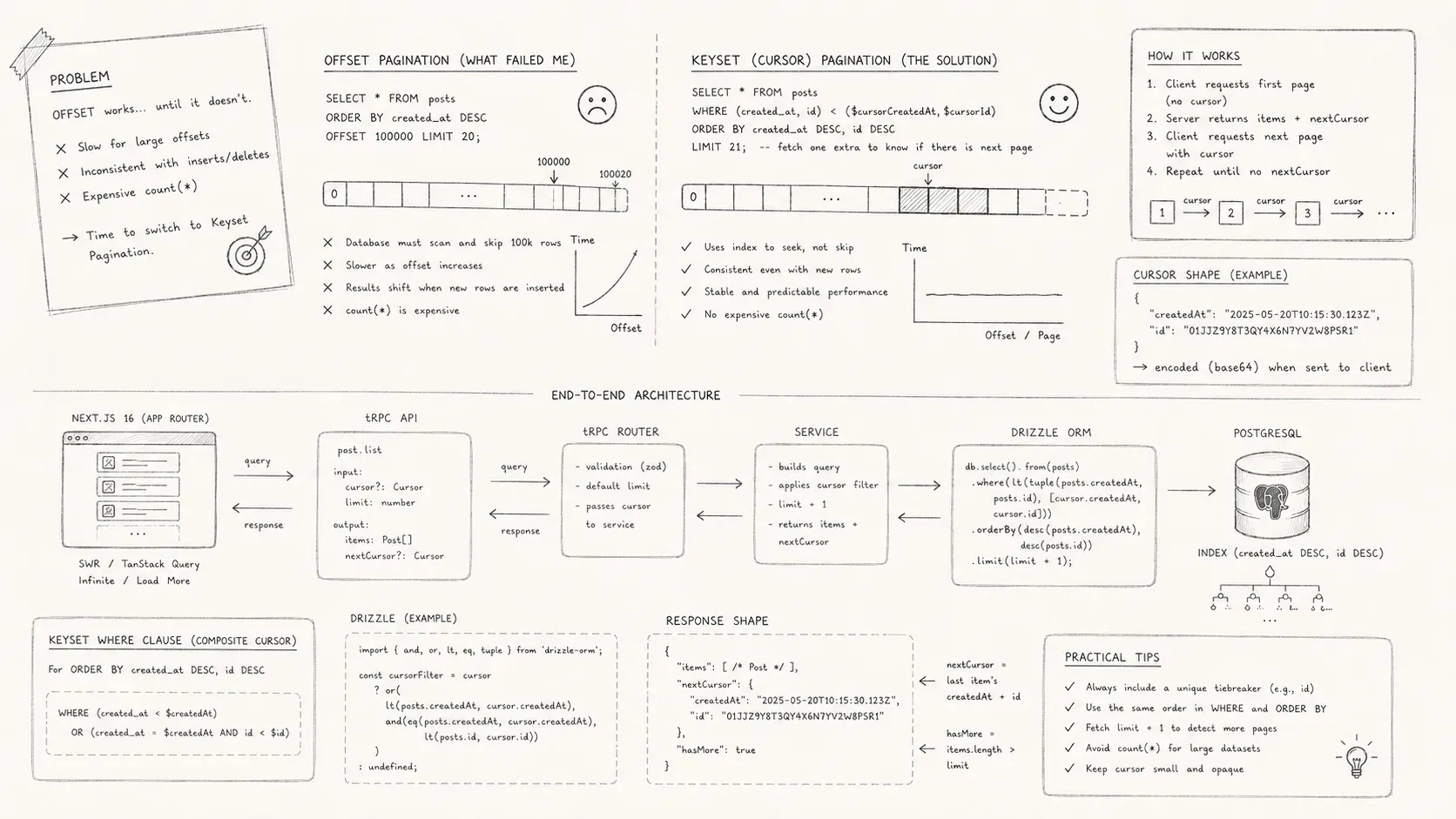
A migration from offset pagination to keyset pagination with PostgreSQL, Drizzle, tRPC, and Next.js 16.
My feed passed one hundred thousand rows, and its LIMIT ... OFFSET ... pagination began to fail in two ways. Later pages took longer to load. New rows also shifted the offsets while users scrolled, which produced duplicates and omissions. I replaced offsets with a cursor-based keyset, added the matching PostgreSQL indexes, and connected the result to Next.js 16, tRPC, and TanStack Query.
When LIMIT and OFFSET break down
Offset pagination needs little setup. Pick a page size, compute an offset from the page number, and apply it after an ORDER BY clause:
For small datasets it works fine, but there are two fundamental problems that only manifest at scale:
-
Performance degrades with large offsets. PostgreSQL must scan and discard
OFFSETrows before returning anything. A test query withLIMIT 10 OFFSET 100 000forces the database to discard one hundred thousand rows just to return ten results. Measurements in a one-million-row table show latency increasing roughly linearly with the offset: a query with an offset of 500 000 is hundreds of times slower than one with an offset of 0. -
Results become inconsistent when the underlying data changes. When you fetch page 1 (
OFFSET 0) and then page 2 (OFFSET pageSize), any insert or delete between those queries shifts the entire result set. New rows can push existing rows forward, causing duplicates or omissions. An article on optimising SQL pagination notes that rows may be duplicated or skipped entirely when using consecutiveOFFSETqueries and there are concurrent inserts or deletes. The database also has to generate the entire result set to apply the offset, which is expensive for complex joins.
I felt both issues acutely. As my ingestion pipeline accelerated, the feed would occasionally repeat articles or skip a batch entirely. Meanwhile my metrics showed that each extra page was slower than the previous one. It was time to admit that OFFSET was the wrong tool for a live, continuously growing dataset.
Keyset pagination
Keyset pagination, also called cursor pagination, removes page numbers. Each query resumes after the last row of the previous page. Choose a stable sort order, usually a timestamp and unique identifier. Encode those fields as a cursor, then use them in the next query's WHERE clause.
-- first page
SELECT *
FROM items
ORDER BY created_at DESC, id DESC
LIMIT 20;

-- subsequent page
SELECT *
FROM items
WHERE (created_at, id) < (cursor.created_at, cursor.id)
ORDER BY created_at DESC, id DESC
LIMIT 20;
Because you're always ordering by deterministic columns, new rows inserted after the current cursor will never appear in previous pages. According to the Drizzle ORM guide, cursor-based pagination offers consistent query results without skipped or duplicated rows and is more efficient than offset because it doesn't need to scan and skip previous rows. The same guide warns that you can't jump directly to an arbitrary page and that the WHERE clause becomes more complex. These trade-offs are acceptable for a feed that users consume sequentially.
I used published_at and a monotonic UUID v7 id as the keyset. Each cursor is base64-encoded JSON with { date, id }. The client treats it as an opaque string. Only the server encodes and decodes it.
eyJwdWJsaXNoZWRfYXQiOiAiMjAyNS0xMi0xMiAxMjoxMjoxMiIsICJpZCI6ICI4MmVlY2FkNC1hMWM5LTQyNWEtOTQ1Zi1hMDM2NGE4MjM5YzEifQ=={
"published_at": "2025-12-12 12:12:12",
"id": "82eecad4-a1c9-425a-945f-a0364a8239c1"
}Database indexes
The query orders by published_at DESC, id DESC, so it needs a composite index with the same columns, order, and direction.
CREATE INDEX idx_items_published_at_id
ON items (published_at DESC, id DESC);
Without a matching index, PostgreSQL can't avoid a full scan. The Drizzle docs emphasise that the sort columns must be properly indexed for cursor-based pagination to work efficiently. I also maintained a separate tsvector column for full-text search and a GIN index on it so that search filters didn't degrade the pagination query.
Beyond indexing, I had to think about composite keys. If two articles share the same published_at timestamp, ordering purely by timestamp will not be deterministic. The tie-breaker id ensures a stable order. The WHERE clause for fetching the next page becomes (published_at < lastDate) OR (published_at = lastDate AND id < lastId). Many call this approach keyset pagination because the combination {published_at, id} uniquely identifies each row.
Build the cursor layer
The cursor layer sits between the API and the database. Its responsibilities include:
-
Decoding the incoming cursor. When the client passes a base64 string, I decode it into an object
{ date, id }. If no cursor is provided, I fetch the first page. -
Cap
limitat 100 to protect the database. -
Build the keyset filter
(published_at < date) OR (published_at = date AND id < id)from the cursor. Omit it for the first page. -
Fetch
limit + 1rows. The extra row reveals whether another page exists without aCOUNT(*)query. Remove it from the result and encode its{date, id}asnextCursor.
These steps live in a utility module named pagination.ts and are reused throughout the database layer. Keeping the cursor rules there prevents separate queries from encoding, decoding, or advancing cursors differently.
Implement the query in Drizzle ORM
Drizzle checks the selected columns and predicates at compile time. Here is a shortened version of my getArticles query:
export async function getArticles(db: Database, params: GetArticlesParams) {
  const pagination = buildPaginationState(params);
  const filters = buildFilters(params, pagination);

  const rows = await applyFilters(
    db
      .select({ ...articles, source: { ...sources } })
      .from(articles)
      .innerJoin(sources, eq(articles.sourceId, sources.id))
      .orderBy(desc(articles.publishedAt), desc(articles.id)),
    filters,
  ).limit(pagination.limit + 1);

  return buildPaginatedResult(rows, pagination, { date: 'publishedAt', id: 'id' });
}
The buildFilters function composes optional filters like category, sentiment, search and sourceId along with the keyset predicate. I order by publishedAt DESC, id DESC, request limit + 1 rows and let buildPaginatedResult slice and encode the cursor.
On the ingestion side, my crawlers POST new articles through an authenticated Hono route. The payload is validated against a Zod schema (createArticleSchema) and then persisted with Drizzle. Using Zod at both the API and database boundaries ensures that the same constraints are enforced everywhere.
Expose the feed through tRPC
I expose my database queries through a tRPC router. Each procedure is declared with a Zod schema for input validation and returns a typed result. My articlesRouter looked like this:
export const articlesRouter = createTRPCRouter({
  list: protectedProcedure
    .input(getArticlesSchema)
    .query(({ ctx, input }) => getArticles(ctx.db, input)),
  create: protectedProcedure
    .input(createArticleSchema)
    .mutation(({ ctx, input }) => createArticle(ctx.db, input)),
  // other procedures
});
Because tRPC infers the output type from getArticles, my React components can import RouterOutputs["articles"]["list"]["items"][number] and know exactly what fields to expect. The cursor string travels unchanged. SuperJSON serializes Date objects without converting them to strings. The tRPC procedure used with useInfiniteQuery must accept a cursor input, which matches the schema's cursor?: string | null field.
Prefetch on the server with Next.js 16
Next.js 16's server components allow me to prefetch tRPC queries during the initial request. In my server component I call prefetch before rendering:
export async function ArticlesPage() {
  prefetch(trpc.articles.list.infiniteQueryOptions({ limit: 12 }));

  return (
    <HydrateClient>
        <ArticlesFeed />
    </HydrateClient>
  );
}
The dehydrated state is passed into HydrateClient so that the client can reuse the initial data without an extra round trip. This pattern makes the first paint instantaneous and ensures that cursors and dates are hydrated correctly.
Load pages with TanStack Query
On the client I wrap the tRPC client with TanStack's useInfiniteQuery hook:
const trpc = useTRPC();
const query = useInfiniteQuery(
    trpc.articles.list.infiniteQueryOptions(
      {
        limit: 12,
      },
      {
        getNextPageParam: (lastPage) => (lastPage.meta.hasNext ? lastPage.meta.nextCursor : null),
        initialCursor: null,
      },
    ),
  );

const articles = React.useMemo(
    () => query.data?.pages.flatMap((page) => page.items) ?? [],
    [query.data],
);
useInfiniteQuery manages the pagination state for me. When the user clicks "Load more," I simply call query.fetchNextPage(). The hook inspects the meta object returned by the server and forwards the opaque nextCursor. TanStack Query caches each cursor separately, so changing filters resets the pagination automatically. It also deduplicates requests and tracks loading states for free.
What changed after the migration
After the migration, two improvements were immediately visible:
-
Stable results. New articles arriving at the top of the feed never cause duplicates or missing entries. Each page is anchored to the last
published_atandidvalues seen, so inserts, updates or deletes between requests don't shuffle the deck. ReadySet's discussion on cursor pagination notes that it remains efficient even for large offsets and produces stable results even if new records are inserted or deleted between page requests. -
Predictable performance. I no longer pay an O(n) penalty when users scroll deep into the feed. Because the query uses an indexed keyset, it jumps directly to the next page instead of discarding thousands of rows. The same ReadySet analysis points out that cursor-based pagination avoids scanning and discarding rows, reducing database load and resource consumption.
There are trade-offs. Users cannot jump to page 37 because a cursor addresses a position, not a numbered page. The helper always returns meta.hasNext, and the client disables "Load more" when it is false. Deletions may leave occasional gaps. I accepted that behavior for a live feed.
Practical guidance
Pagination crosses the database, API, cache, and interface. The migration required changes at each layer, but it removed the increasing offset cost and kept feed pages stable while new articles arrived.
If you're considering a similar migration, start by:
-
Choose a keyset. Pick columns that uniquely identify each row and match the required order, usually a timestamp and primary key.
-
Creating the right indexes. Without a composite index that matches your keyset and sort direction, keyset pagination will be slow.
-
Encapsulating pagination logic. Centralise cursor encoding/decoding and the
WHEREclause generation in a helper module. -
Using shared schemas. Define Zod schemas (or equivalent) once and reuse them across your backend and frontend. This prevents type drift and ensures the cursor is always passed correctly.
-
Use the pagination APIs already available. Drizzle builds typed predicates, tRPC carries the cursor, and TanStack Query tracks successive pages.
Offset pagination remains useful for small, mostly static datasets and interfaces that need numbered pages. A continuously updated feed benefits more from keyset pagination, provided its sort columns have a matching index.