Deploying Ruby on Rails with Capistrano, Puma, and Nginx
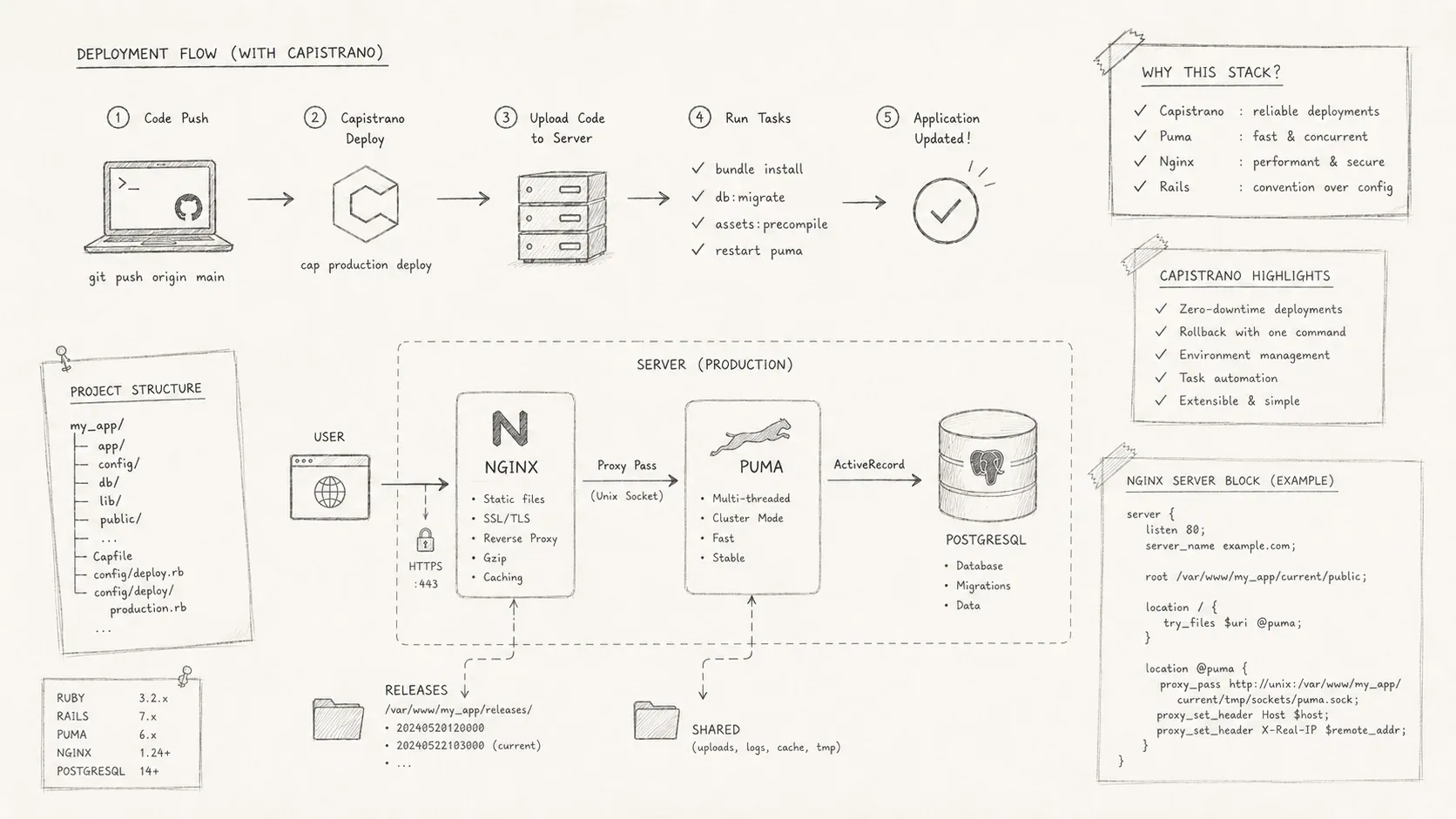
A practical deployment walkthrough for Rails, Capistrano, Puma, Nginx, and an Ubuntu VPS.
I deployed my first Ruby on Rails 7.1 application to an Ubuntu VPS on AWS Lightsail. Getting Capistrano, Puma, Nginx, and systemd to work together took more debugging than I expected. This guide records the configuration that worked.
Context
The application calls an API whose URLs live in a .env file. It uses SQLite in production. To suppress Rails' production warning for that choice, add config.active_record.sqlite3_production_warning = false to config/environments/production.rb.
This deployment uses three main tools:
-
Capistrano automates deployment tasks on the remote server.
-
Puma runs the Ruby and Rack application.
-
Nginx acts as the reverse proxy in front of Puma.
Capistrano connects to the server over SSH, so you need SSH access. The application code must also live in a version-control repository such as Git.
Configure the deployment
Prepare the remote server
Install the same Ruby version on the server that you use in development. RVM and rbenv can manage Ruby versions. Then install Bundler for the application's dependencies.
This application builds assets with Yarn and Webpack, so the server also needs Node.js. Install any other services your application uses, such as Redis or MySQL.
Install the gems
Add the deployment gems with the version constraints shown below. The constraints keep the plugins on compatible releases.
gem 'puma', '~> 6.0.0', '< 7'
gem 'dotenv-rails' # to handle .env files
gem 'sd_notify', '~> 0.1.0' # hotfix not actually used

group :development do
  gem 'capistrano'
  gem 'capistrano3-puma', '6.0.0.beta.1' # supports puma 6+
  gem 'capistrano-rails'
  gem 'capistrano-rvm' # capistrano-rbenv for rbenv
end
Then run bundle install to install the gems with the specified versions.
Set up Capistrano
cap installThis command will create several files and folders in your project:
-
Capfile
-
config/deploy.rb
-
config/deploy/production.rb
-
config/deploy/staging.rb
Load the required plugins in Capfile:
# frozen_string_literal: true

require 'capistrano/setup'
require 'capistrano/deploy'
require 'capistrano/scm/git'
install_plugin Capistrano::SCM::Git

# Include tasks from other gems included in your Gemfile
require 'capistrano/rvm' # 'capistrano/rbenv' for rbenv
require 'capistrano/bundler'
require 'capistrano/rails' # will include assets and migrations tasks
require 'capistrano/puma'
require 'capistrano/puma/nginx'
install_plugin Capistrano::Puma
install_plugin Capistrano::Puma::Systemd

# Load custom tasks from `lib/capistrano/tasks` if you have any defined
Dir.glob('lib/capistrano/tasks/*.rake').each { |r| import r }
Define the shared files, linked directories, repository, and Puma settings in config/deploy.rb.
# frozen_string_literal: true
lock '~> 3.19.1'

set :application, 'ecovet.cloud' # your app name
set :repo_url, 'git@github.com:bernard-ng/ecovet.cloud.git'
set :branch, 'main'
set :deploy_to, '/var/www/html/ecovet.cloud' # path on remote server

set :pty, true
append :linked_files, 'config/master.key', '.env', 'config/database.yaml'
append :linked_dirs, 'log', 'tmp/pids', 'tmp/cache', 'tmp/sockets', 'vendor', 'storage'

set :keep_releases, 2
set :ssh_options, {
  forward_agent: true,
  auth_methods: %w[publickey],
  keys: %w[~/.ssh/LightsailDefaultKey-eu-west-2.pem]
}

# puma
set :puma_workers, 2 # check your CPU specs
set :puma_rackup, -> { File.join(current_path, 'config.ru') }
set :puma_state, "#{shared_path}/tmp/pids/puma.state"
set :puma_pid, "#{shared_path}/tmp/pids/puma.pid"
set :puma_bind, "unix://#{shared_path}/tmp/sockets/puma.sock"
set :puma_default_control_app, "unix://#{shared_path}/tmp/sockets/pumactl.sock"
set :puma_access_log, "#{shared_path}/log/puma_access.log"
set :puma_error_log, "#{shared_path}/log/puma_error.log"
set :puma_conf, "#{shared_path}/puma.rb"

set :puma_control_app, false
set :puma_systemctl_user, :system
set :puma_service_unit_type, 'simple' # or notify
set :puma_enable_socket_service, true # mendatory in our case

# nginx
set :nginx_config_name, 'ecovet.cloud'
set :nginx_server_name, 'ecovet.cloud'
set :nginx_use_ssl, false # will be handled by certbot
Configure the production server in config/deploy/production.rb:
# frozen_string_literal: true
# config/deploy/production.rb

server 'ecovet.cloud', user: 'ubuntu', roles: %w[app db web], ssh_options: { forward_agent: true }
Add the configuration templates
systemd keeps Puma running and restarts it after a failure or server reboot.
The setup has two units:
-
The Puma service defines the command, user, and restart policy.
-
The Puma socket carries HTTP requests between Nginx and Puma.
Add the templates below and adjust them for your server. At the time of writing, capistrano3-puma had not been updated for two years, and its default configuration caused problems in this setup.
-
config/deploy/templates/puma.rb.erb
-
config/deploy/templates/puma.service.erb
-
config/deploy/templates/puma.socket.erb. Set:puma_enable_socket_servicetotrueinconfig/deploy.rb, or create the socket service manually.
config/deploy/templates/puma.rb.erb:
#!/usr/bin/env puma

directory '<%= current_path %>'
rackup "<%=fetch(:puma_rackup)%>"
environment '<%= fetch(:puma_env) %>'
<% if fetch(:puma_tag) %>
  tag '<%= fetch(:puma_tag)%>'
<% end %>
pidfile "<%=fetch(:puma_pid)%>"
state_path "<%=fetch(:puma_state)%>"
stdout_redirect '<%=fetch(:puma_access_log)%>', '<%=fetch(:puma_error_log)%>', true


threads <%=fetch(:puma_threads).join(',')%>

<%= puma_bind %>
<% if fetch(:puma_control_app) %>
activate_control_app "<%= fetch(:puma_default_control_app) %>"
<% end %>
workers <%= puma_workers %>
<% if fetch(:puma_worker_timeout) %>
worker_timeout <%= fetch(:puma_worker_timeout).to_i %>
<% end %>

<% if puma_preload_app? %>
preload_app!
<% else %>
prune_bundler
<% end %>

on_restart do
  puts 'Refreshing Gemfile'
  ENV["BUNDLE_GEMFILE"] = "<%= fetch(:bundle_gemfile, "#{current_path}/Gemfile") %>"
end

<% if puma_preload_app? and fetch(:puma_init_active_record) %>
on_worker_boot do
  ActiveSupport.on_load(:active_record) do
    ActiveRecord::Base.establish_connection
  end
end
<% end %>config/deploy/templates/puma.service.erb:
[Unit]
Description=Puma HTTP Server for <%= "#{fetch(:application)} (#{fetch(:stage)})" %>
<%= "Requires=#{fetch(:puma_service_unit_name)}.socket" if fetch(:puma_enable_socket_service) %>
After=syslog.target network.target

[Service]
Type=<%= service_unit_type %>
WatchdogSec=10
<%="User=#{puma_user(@role)}" if fetch(:puma_systemctl_user) == :system %>
WorkingDirectory=<%= current_path %>
ExecStart=<%= expanded_bundle_command %> exec --keep-file-descriptors puma -e <%= fetch(:puma_env) %> -C /var/www/html/ecovet.cloud/shared/puma.rb
ExecReload=/bin/kill -USR1 $MAINPID
PIDFile=<%= fetch(:puma_pid)%>
<%- Array(fetch(:puma_service_unit_env_files)).each do |file| %>
<%="EnvironmentFile=#{file}" -%>
<% end -%>
<% Array(fetch(:puma_service_unit_env_vars)).each do |environment_variable| %>
<%="Environment=\"#{environment_variable}\"" -%>
<% end -%>

# if we crash, restart
RestartSec=1
Restart=on-failure

<%="StandardOutput=append:#{fetch(:puma_access_log)}" if fetch(:puma_access_log) %>
<%="StandardError=append:#{fetch(:puma_error_log)}" if fetch(:puma_error_log) %>

SyslogIdentifier=<%= fetch(:puma_service_unit_name) %>
[Install]
WantedBy=<%=(fetch(:puma_systemctl_user) == :system) ? "multi-user.target" : "default.target"%>config/deploy/templates/puma.socket.erb:
[Unit]
Description=Puma HTTP Server Accept Sockets for <%= "#{fetch(:application)} (#{fetch(:stage)})" %>

[Socket]
<% puma_binds.each do |bind| -%>
<%= "ListenStream=#{bind.local.address}" %>
<% end -%>

Accept=no
<%= "NoDelay=true" if fetch(:puma_systemctl_user) == :system %>
ReusePort=true
Backlog=1024

SyslogIdentifier=puma_socket

[Install]
WantedBy=sockets.target
Upload the Nginx and Puma configuration
Upload the configuration with the following Capistrano tasks. You only need to repeat this step when the Puma, Nginx, or systemd configuration changes.
cap production puma:config # will upload puma.rb
cap production puma:nginx_config # will upload nginx config
cap production puma:install # will create systemd service and stocket
cap production puma:start # will start the puma service
Add .env support
Edit config/application.rb to load .env files:
# ...
# Load .env file
Dotenv::Rails.load
HTTPS support
Let's Encrypt issues free TLS certificates. Certbot automates certificate installation and renewal for Nginx. This TLS overview explains the certificate and key concepts behind the setup.
# remote server
sudo apt install certbot python3-certbot-nginx
sudo certbot --nginx
sudo service nginx reload
Deploy
Run the production deployment:
cap production deployCapistrano performs these tasks:
-
Clone the Git repository into
releases/{timestamp}on the server. -
Link entries from
linked_filesandlinked_dirsbetween thesharedand current release directories. -
Install the Ruby dependencies from
Gemfilewithbundle install. -
Compile the application assets with Yarn and Webpack when needed.
-
Run database migrations with
bundle exec rails db:migrate. -
Start or restart Puma with
config/puma.rb.
A reusable deployment path
This configuration put Ecovet.cloud online. It was a study project, so the deployment was temporary, but the Capistrano, systemd, Puma, and Nginx setup is reusable.