Passkey authentication in Symfony with WebAuthn
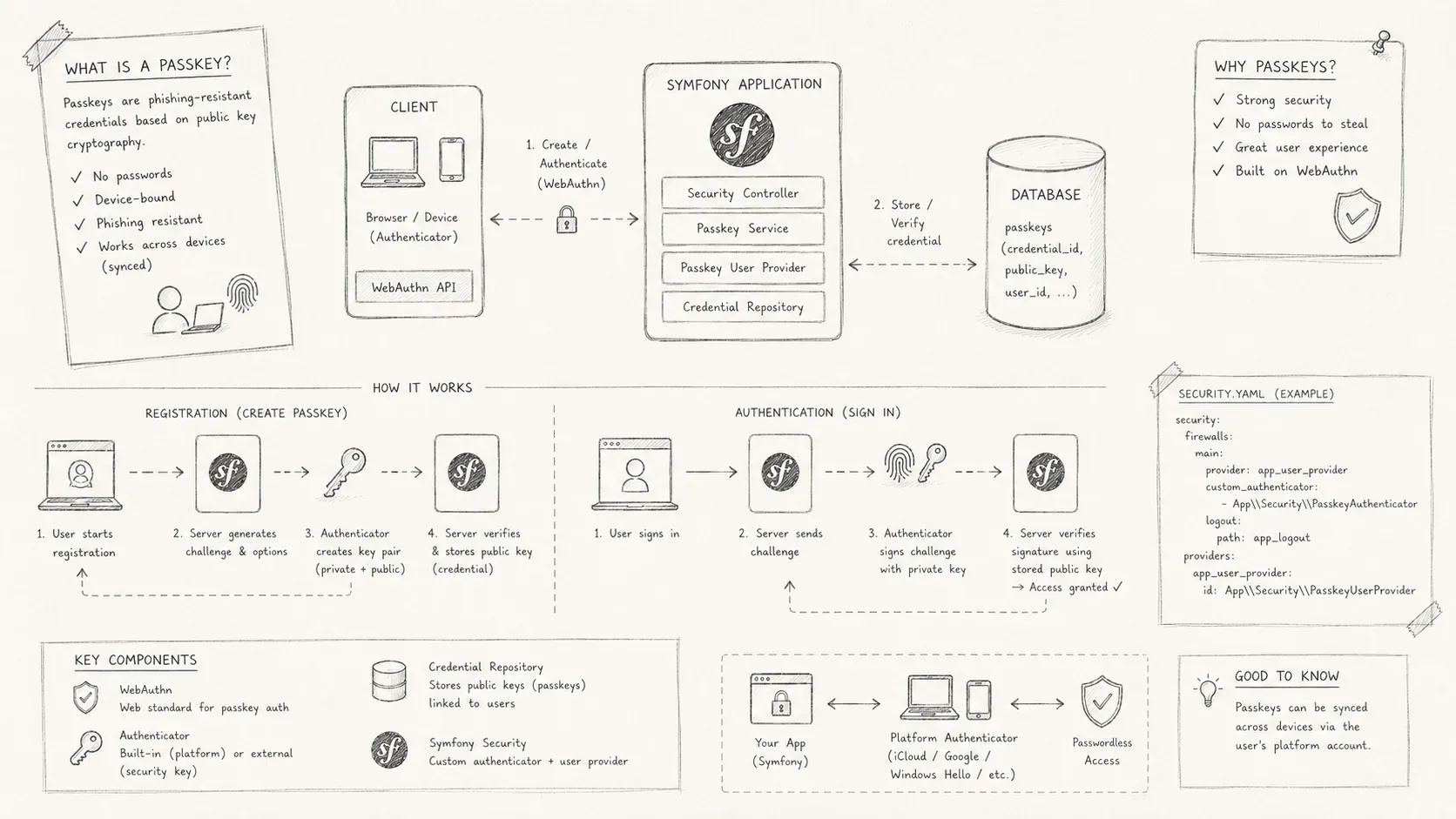
A Symfony passkey authentication setup using WebAuthn and open-source Symfony bundles.
Passkeys are WebAuthn credentials that use public-key cryptography. A user signs in with an authenticator such as a phone, security key, or biometric device instead of entering a password.
This guide implements passkey registration and login with Symfony 7.1, PHP 8.3, and open-source bundles. It does not require an authentication SaaS provider.
Florent Morselli maintains the libraries used here:
-
webauthn-lib handles the WebAuthn protocol.
-
webauthn-stimulus-bundle handles browser interaction with the authenticator.
-
webauthn-symfony-bundle integrates the library with Symfony.
Setting up a Symfony project
Start with Symfony's Maker Bundle to generate password login and registration. Passkey support will extend those existing flows.
docker compose up -d && symfony serve --no-tlsUser entity
The generated user class is enough for this example. It already contains email, password, and roles.
<?php

namespace App\Entity;

// importations...

#[ORM\Table(name: '`user`')]
#[ORM\Entity(repositoryClass: UserRepository::class)]
#[ORM\UniqueConstraint(name: 'UNIQ_IDENTIFIER_EMAIL', fields: ['email'])]
#[UniqueEntity(fields: ['email'], message: 'something went wrong !')]
class User implements
    UserInterface,
    PasswordAuthenticatedUserInterface
{
    #[ORM\Id]
    #[ORM\GeneratedValue]
    #[ORM\Column]
    private ?int $id = null;

    #[ORM\Column(length: 180)]
    private ?string $email = null;

    #[ORM\Column]
    private array $roles = [];

    #[ORM\Column(nullable: true)]
    private ?string $password = null;

    // methods...
}
Generate and apply the migration to the PostgreSQL database running in Docker.
symfony console make:migration
symfony console doctrine:migrations:migrate
Add two persistence methods to UserRepository:
<?php

namespace App\Repository;

// importations...

class UserRepository extends ServiceEntityRepository implements
    PasswordUpgraderInterface
{
    // constructor...

    public function save(User $user): void
    {
        $this->getEntityManager()->persist($user);
        $this->getEntityManager()->flush();
    }

    public function remove(User $user): void
    {
        $this->getEntityManager()->remove($user);
        $this->getEntityManager()->flush();
    }

    // interface implementation...
}
Restricted area
Create a MainController for an authenticated-only page.
symfony console make:controller MainControllerSymfony can restrict the route in either of two places:
-
Add the
IS_GRANTEDattribute to the controller. -
Define an access-control rule in
config/packages/security.yaml.
<?php

namespace App\Controller;

// importations...

#[IsGranted('IS_AUTHENTICATED_FULLY')]
class MainController extends AbstractController
{
    #[Route('/main', name: 'app_main')]
    public function index(): Response
    {
        return $this->render('main/index.html.twig', [
            'controller_name' => 'MainController',
        ]);
    }
}
Setting up passkeys authentication
Install the WebAuthn libraries introduced above:
composer require web-auth/webauthn-lib
composer require web-auth/webauthn-symfony-bundle
composer require web-auth/webauthn-stimulus
The relying party
The relying party, or RP, is the application that asks the user's authenticator to register or verify a passkey. The authenticator may be a phone, hardware key, or biometric device.
-
The RP name is the application name shown to the user, such as "My Application."
-
The RP ID is usually the application's domain, such as
localhostormyapp.com. It binds each credential to that domain.
Configure both values with environment variables:
# .env

###> web-auth/webauthn-symfony-bundle ###
RELYING_PARTY_ID=localhost
RELYING_PARTY_NAME="My Application"
###< web-auth/webauthn-symfony-bundle ###
Credential source
After registration, the application receives a PublicKeyCredentialSource. It stores the credential and authenticator data required for later authentication attempts.
<?php

namespace App\Entity;

use Symfony\Component\Uid\Uuid;
use App\Repository\WebauthnCredentialSourceRepository;
use Doctrine\ORM\Mapping as ORM;
use Webauthn\PublicKeyCredentialSource;
use Webauthn\TrustPath\TrustPath;

#[ORM\Table(name: 'webauthn_credentials')]
#[ORM\Entity(repositoryClass: WebauthnCredentialSourceRepository::class)]
class WebauthnCredentialSource extends PublicKeyCredentialSource
{
    #[ORM\Id]
    #[ORM\GeneratedValue]
    #[ORM\Column]
    private ?int $id = null;

    public function __construct(
        string $publicKeyCredentialId,
        string $type,
        array $transports,
        string $attestationType,
        TrustPath $trustPath,
        Uuid $aaguid,
        string $credentialPublicKey,
        string $userHandle,
        int $counter
    ) {
        parent::__construct(
            $publicKeyCredentialId, $type, $transports,
            $attestationType,$trustPath,
            $aaguid, $credentialPublicKey,
            $userHandle, $counter
        );
    }
}<?php
namespace App\Repository;
use App\Entity\User;
use App\Entity\WebauthnCredentialSource;
use Doctrine\Persistence\ManagerRegistry;
use Webauthn\{
Bundle\Repository\DoctrineCredentialSourceRepository,
PublicKeyCredentialSource
};
final class WebauthnCredentialSourceRepository extends DoctrineCredentialSourceRepository
{
public function __construct(ManagerRegistry $registry)
{
parent::__construct($registry, WebauthnCredentialSource::class);
}
public function saveCredentialSource(PublicKeyCredentialSource $publicKeyCredentialSource): void
{
if (!$publicKeyCredentialSource instanceof WebauthnCredentialSource) {
$publicKeyCredentialSource = new WebauthnCredentialSource(
$publicKeyCredentialSource->publicKeyCredentialId,
$publicKeyCredentialSource->type,
$publicKeyCredentialSource->transports,
$publicKeyCredentialSource->attestationType,
$publicKeyCredentialSource->trustPath,
$publicKeyCredentialSource->aaguid,
$publicKeyCredentialSource->credentialPublicKey,
$publicKeyCredentialSource->userHandle,
$publicKeyCredentialSource->counter
);
}
parent::saveCredentialSource($publicKeyCredentialSource);
}
}Credential user
The credential user represents the application user in the WebAuthn protocol.
WebAuthn requires two unique values:
-
A unique user identifier.
-
A unique username, which is the email address in this example.
<?php

namespace App\Repository;

use App\Entity\User;
use LogicException;
use Random\RandomException;
use Doctrine\DBAL\Exception;
use Doctrine\DBAL\Connection;
use ParagonIE\ConstantTime\Base64UrlSafe;
use Webauthn\{
    Exception\InvalidDataException,
    Bundle\Repository\CanGenerateUserEntity,
    Bundle\Repository\CanRegisterUserEntity,
    PublicKeyCredentialUserEntity,
    Bundle\Repository\PublicKeyCredentialUserEntityRepositoryInterface
};

final readonly class WebauthnCredentialUserRepository implements
    PublicKeyCredentialUserEntityRepositoryInterface,
    CanRegisterUserEntity,
    CanGenerateUserEntity
{
    public function __construct(
        private UserRepository $userRepository,
        private Connection $connection
    ) {
    }

    /**
     * @see https://dba.stackexchange.com/q/253090
     * @see https://dba.stackexchange.com/a/253098
     * @todo using UUIDs would be a better idea as they are decoupled from the database
     */
    public function generateNextUserEntityId(): string
    {
        return (string) $this->connection
            ->executeQuery('SELECT last_value + 1 FROM user_id_seq;')
            ->fetchOne();
    }

    public function saveUserEntity(PublicKeyCredentialUserEntity $userEntity): void
    {
        /** @var User|null $user */
        $user = $this->userRepository->findOneBy(['id' => $userEntity->id]);

        if ($user === null) {
            $user = (new User())
                ->setEmail($userEntity->name)
                ->setRoles(['ROLE_USER']);
        }

        $this->userRepository->save($user);
    }

    public function findOneByUsername(string $username): ?PublicKeyCredentialUserEntity
    {
        $user = $this->userRepository->findOneBy(['email' => $username]);
        return $this->getUserEntity($user);
    }

    public function findOneByUserHandle(string $userHandle): ?PublicKeyCredentialUserEntity
    {
        $user = $this->userRepository->findOneBy(['id' => $userHandle]);
        return $this->getUserEntity($user);
    }

    public function generateUserEntity(?string $username, ?string $displayName): PublicKeyCredentialUserEntity
    {
        $randomUserData = Base64UrlSafe::encodeUnpadded(random_bytes(32));

        return PublicKeyCredentialUserEntity::create(
            $username ?? $randomUserData,
            $this->generateNextUserEntityId(),
            $displayName ?? $username ?? $randomUserData,
            null
        );
    }

    private function getUserEntity(null|User $user): ?PublicKeyCredentialUserEntity
    {
        if ($user === null) {
            return null;
        }

        return new PublicKeyCredentialUserEntity(
            $user->getUserIdentifier(),
            (string) $user->getId(),
            $user->getDisplayName(),
            null
        );
    }
}
Configure the WebAuthn bundle with the custom credential and user repositories. The configuration also defines the creation and request profiles.
# config/packages/webauthn.yaml
webauthn:
    credential_repository: 'App\Repository\WebauthnCredentialSourceRepository'
    user_repository: 'App\Repository\WebauthnCredentialUserRepository'
    creation_profiles:
        default:
            rp:
                name: '%env(RELYING_PARTY_NAME)%'
                id: '%env(RELYING_PARTY_ID)%'
    request_profiles:
        default:
            rp_id: '%env(RELYING_PARTY_ID)%'
Enable the WebAuthn authenticator in the main firewall.
# config/packages/security.yaml
security:
    firewalls:
        main:
            # ...
            webauthn:
                registration:
                    enabled: true
                    profile: default
                    routes:
                        options_path: '/passkeys/attestation/options'
                        result_path: '/passkeys/attestation/result'
                authentication:
                    enabled: true
                    profile: default
                    routes:
                        options_path: '/passkeys/assertion/options'
                        result_path: '/passkeys/assertion/result'
Handle localhost
Local development may run without HTTPS. To test passkeys there, list the local RP ID as a secure context and bypass scheme verification for that ID.
parameters:
    # Do not use this in production - for testing purposes only
    webauthn.secured_rp_ids: ['localhost']
Registration and login with passkeys
The provided Stimulus controller connects the existing forms to WebAuthn.
Registration (creation_profiles, attestation ceremony)
-
Users can register an authenticator while creating an account. The Stimulus controller handles the WebAuthn registration ceremony.
-
Users can keep password authentication and add a passkey later from account settings.
{{ form_start(registrationForm, {
    attr: {
         ...stimulus_controller('@web-auth/webauthn-stimulus', {
                usernameField: registrationForm.email.vars.full_name,
                creationSuccessRedirectUri: path('app_main'),
                creationResultUrl: path('webauthn.controller.security.main.creation.result'),
                creationOptionsUrl: path('webauthn.controller.security.main.creation.options'),
            }).toArray
     }
}) }}

     {{ form_row(registrationForm.email) }}
     {{ form_row(registrationForm.plainPassword, {label: 'Password'}) }}

     <button type="submit">Register</button>
     <button {{ stimulus_action('@web-auth/webauthn-stimulus', 'signup') }}>
         Register with passkey
     </button>
{{ form_end(registrationForm) }}
Login (request_profiles, assertion ceremony)
-
A registered user can sign in with a passkey. The application sends the required challenge to the authenticator.
-
Symfony grants access after the authenticator returns a valid response.
<form method="post" {{ stimulus_controller('@web-auth/webauthn-stimulus',
    {
       useBrowserAutofill: true,
       usernameField: '_username',
       requestSuccessRedirectUri: path('app_main'),
       requestResultUrl: path('webauthn.controller.security.main.request.result'),
       requestOptionsUrl: path('webauthn.controller.security.main.request.options')
    }
) }}>

    // input[name=_username]
    // input[name=_password]
    // input[name=_csrf_token, type=hidden]

     <button type="submit">Connect</button>
     <button {{ stimulus_action('@web-auth/webauthn-stimulus', 'signin') }}>
        Connect with passkey
     </button>
  </div>
</form>
Live demo


What the passkey setup stores
This setup adds passkey registration and login to Symfony without handing authentication to a SaaS provider. The application stores public-key credentials, while the user's authenticator keeps the private key.